# Edit your site's .env environment file
> Edit a site's .env in Vimonto Deploy: stored encrypted, written to shared/.env, merged with .env.example on the first deploy, with a history to restore.
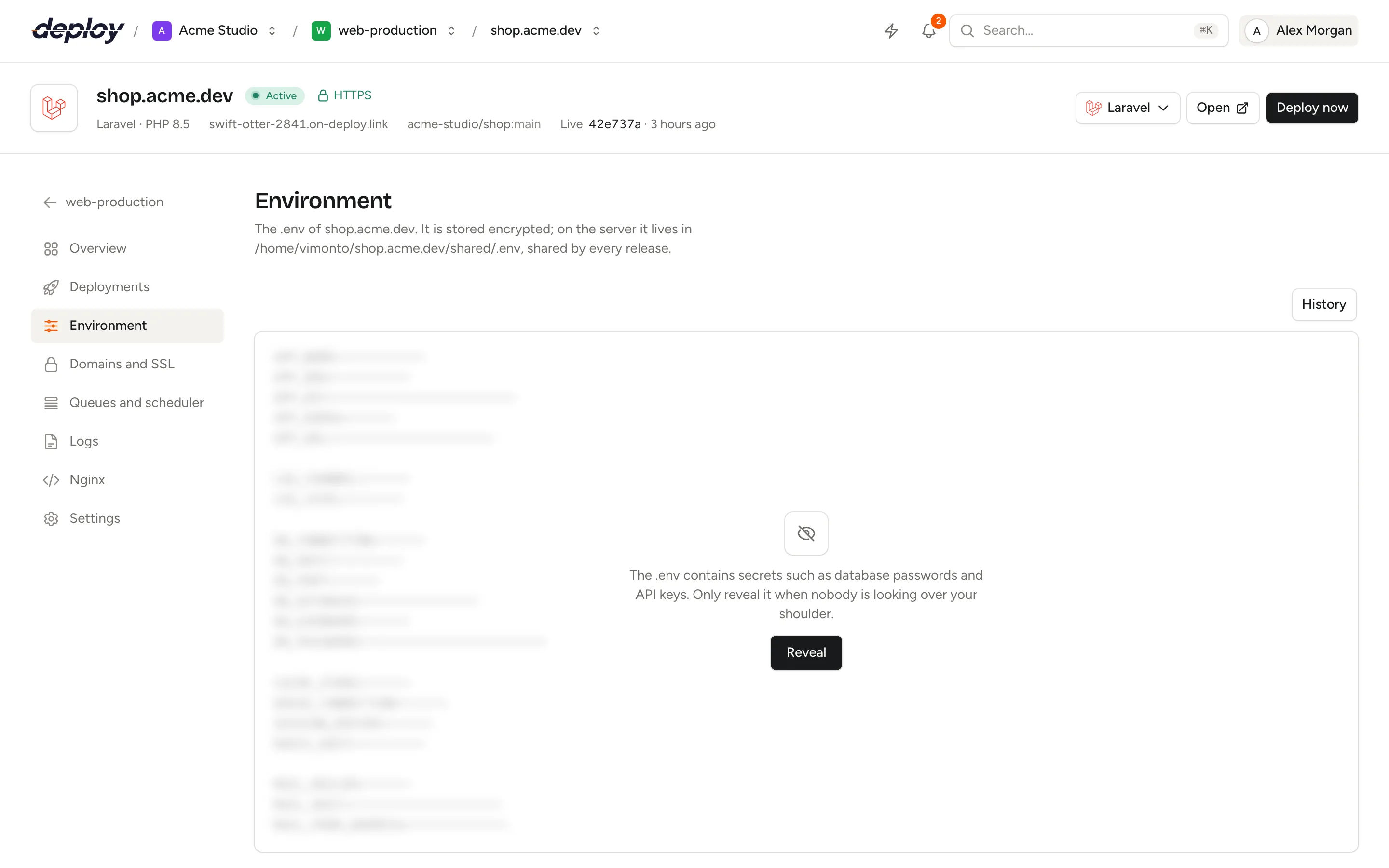
The **environment** of a site is its `.env` file: the settings and secrets your app reads at runtime, such as the app key, database password and API keys. In Vimonto Deploy you edit it on the site's **Environment** page. It is stored encrypted and written to the server as one file that every release shares.
Because the `.env` lives outside the releases, it stays the same from one deploy to the next, and you never put secrets in your repository. Every saved version is kept, so you can see what changed and restore an earlier one.
## Where is the .env stored?
On the server, the `.env` is at `shared/.env` in the site's directory, for example `/home/vimonto/shop.example.com/shared/.env`. It belongs to the site's user and only that user (and its group) can read it.
During every deploy, the release gets a link to it: `releases/{release}/.env` points to `shared/.env`. For a [monorepo](https://ops.vimonto.com/docs/sites/create-a-site#deploy-a-monorepo), the link is placed in the app's root directory inside the release. Every release therefore reads the same file, and a [rollback](https://ops.vimonto.com/docs/sites/deployments#roll-back-to-an-earlier-release) does not change your settings.
In Vimonto Deploy, the content is stored encrypted in the database. What you save on the Environment page is what is written to the server.
## View and edit the .env
1. Open the site and go to **Environment**.
2. The keys are visible, but the values are masked and blurred. Click **Reveal** to load the real content into the editor.
3. Make your changes and click **Save and write**, or press ⌘ S (Ctrl S).
Saving writes the file to the server straight away, as a background task you can follow in the site header. Saving is only possible after **Reveal**, so you never overwrite a file you have not seen.
> [!NOTE]
> The `.env` holds passwords and keys, so only people who can manage sites see it. Other members of the organization see **Only for people who can change the site**. See [members and roles](https://ops.vimonto.com/docs/organization/members-and-roles). Each **Reveal** is recorded in the [audit log](https://ops.vimonto.com/docs/organization/audit-log).
### Refresh the config cache and restart workers when you save
Some things read the `.env` only when they start, or from a cache. For a Laravel site, and for any site with processes or [site features](https://ops.vimonto.com/docs/sites/site-features), **Save and write** first opens **Save the .env** with two choices:
| Option | What it does |
|---|---|
| **Refresh the config cache** | Laravel sites only. Runs `php artisan config:cache` in the live release, so a cached configuration does not keep the old values. |
| **Restart the workers** | Laravel queue workers finish their job and restart (`queue:restart`); Horizon, Reverb and the site's other processes restart too, so they read the new values. |
Both are on the first time. Vimonto Deploy remembers your choices for this site, for you, and uses them as the defaults next time. Click **Save and write** in the dialog to save. Other sites save straight away, without the dialog.
## See and restore earlier versions
Every `.env` that is saved becomes a version, whoever or whatever changed it: you on this page, the site's creation, the first deploy that built it on `.env.example`, a [site feature](https://ops.vimonto.com/docs/sites/site-features) that set its keys, or a restore. Click **History** to see them, newest first. The newest 50 versions of each site are kept.
Each version shows what it came from (**Site created**, **Built on .env.example**, **Copied from another site**, **Edited** or **Restored**), who saved it (**System** for changes made by Vimonto Deploy itself) and when, and which keys changed: `+` added, `−` removed and `~` changed. The values are only shown after you clicked **Reveal**; before that you only see the keys.
To go back to an earlier version, click **Restore** next to it and confirm. Its content replaces the current `.env` and is written to the server. The version you replace stays in the history, so a restore can be undone the same way. A restore does not refresh the config cache or restart workers; deploy again, or save once more with those options, if your app needs that.
## What is in the .env of a new site?
For Laravel and Statamic sites, Vimonto Deploy writes a production `.env` when the site is created:
| Key | Value |
|---|---|
| `APP_NAME` | The first part of the domain. |
| `APP_ENV`, `APP_DEBUG` | `production` and `false`. |
| `APP_KEY` | A newly generated key. |
| `APP_URL` | `http://` and the site's domain. |
| `APP_LOCALE`, `APP_FALLBACK_LOCALE` | `en`. |
| `LOG_CHANNEL`, `LOG_LEVEL` | `daily` and `error`. |
| `DB_CONNECTION`, `DB_HOST`, `DB_PORT`, `DB_DATABASE`, `DB_USERNAME`, `DB_PASSWORD` | The database connected when the site was created, if any. |
| `SESSION_DRIVER`, `CACHE_STORE`, `QUEUE_CONNECTION` | `redis` on an app server (which has Redis), otherwise `database`. |
| `REDIS_HOST`, `REDIS_PORT` | `127.0.0.1` and `6379`. |
| `MAIL_MAILER` | `log`, until you configure a mail service. |
When the database uses the server's own database user and its password is no longer known to Vimonto Deploy, `DB_PASSWORD` is left empty with a comment asking you to fill it in.
Other sites start without a `.env`. You can write one on the Environment page whenever your app needs it. A site on a load balancer has no Environment page: set the `.env` of the site on each app server behind it.
### Merging with .env.example on the first deploy
If your repository has a `.env.example`, the first deploy rebuilds the `.env` on top of it. The result follows the example's keys, order and comments, with the values Vimonto Deploy generated filled in (also where the example has the key commented out, as Laravel does for `DB_HOST`). Generated keys the example lacks are added at the end.
That way your app's own keys, such as `VITE_*` or `AWS_*`, are already in place for you to fill in. Until the first deploy, the Environment page says **Completed on the first deploy**. The merge happens only once, before the deploy script runs, and shows up in the history as **Built on .env.example**; after that the `.env` is exactly what you make it.
## Do I need to clear the config cache after changing the .env?
Laravel apps that cache their configuration (`php artisan optimize` or `config:cache`, as the default deploy script does) do not read the `.env` again by themselves. Leave **Refresh the config cache** on when you save, and Vimonto Deploy runs `php artisan config:cache` for you. Otherwise, deploy again, so the deploy script caches the new values.
> [!TIP]
> Values used by your frontend build, such as `VITE_APP_NAME`, are baked in when the build runs. Deploy again after changing them.
## Which features change the .env?
Some [site features](https://ops.vimonto.com/docs/sites/site-features) need settings in the `.env`, for example Horizon (`QUEUE_CONNECTION=redis`), Reverb (`BROADCAST_CONNECTION` and the `REVERB_*` keys) and Nightwatch (`NIGHTWATCH_TOKEN`). Their dialog shows exactly which keys they set before you switch them on.
When a feature is switched on, keys that already exist get their new value in place, and missing keys are added at the end under a comment with the feature's name. Everything else in the file stays as it was, and the change is kept in the history. For Laravel sites with a cached config, the cache is rebuilt afterwards. Switching a feature off leaves its keys in the `.env`.
## Frequently asked questions
### Is the .env included in my repository?
No, and it should not be. The `.env` is kept by Vimonto Deploy and written to `shared/.env` on the server. Keep a `.env.example` without secrets in your repository instead.
### Does saving the .env restart my app?
Only what you choose in the save dialog. PHP reads the file on the next request, unless the configuration is cached: **Refresh the config cache** takes care of that. Queue workers and other processes keep the values they started with until they restart: **Restart the workers** does that right away, and every deploy does it too.
### I saved a mistake. How do I undo it?
Open **History**, find the version from before your change and click **Restore**.
### What happens to the .env when I delete the site?
It is removed from the server together with the site's directory, releases, workers and certificates. Copy it first if you still need it.