

The Vimonto Deploy API lets scripts and CI pipelines work with your organizations over HTTPS and JSON: list servers and sites, start a deploy and follow it, create and remove databases, run backups and recipes. Every request is authenticated with a personal API token that you make in your account.
A token acts as you. It can only do what your role allows, only on the servers you have access to, and only within the scopes you gave it.
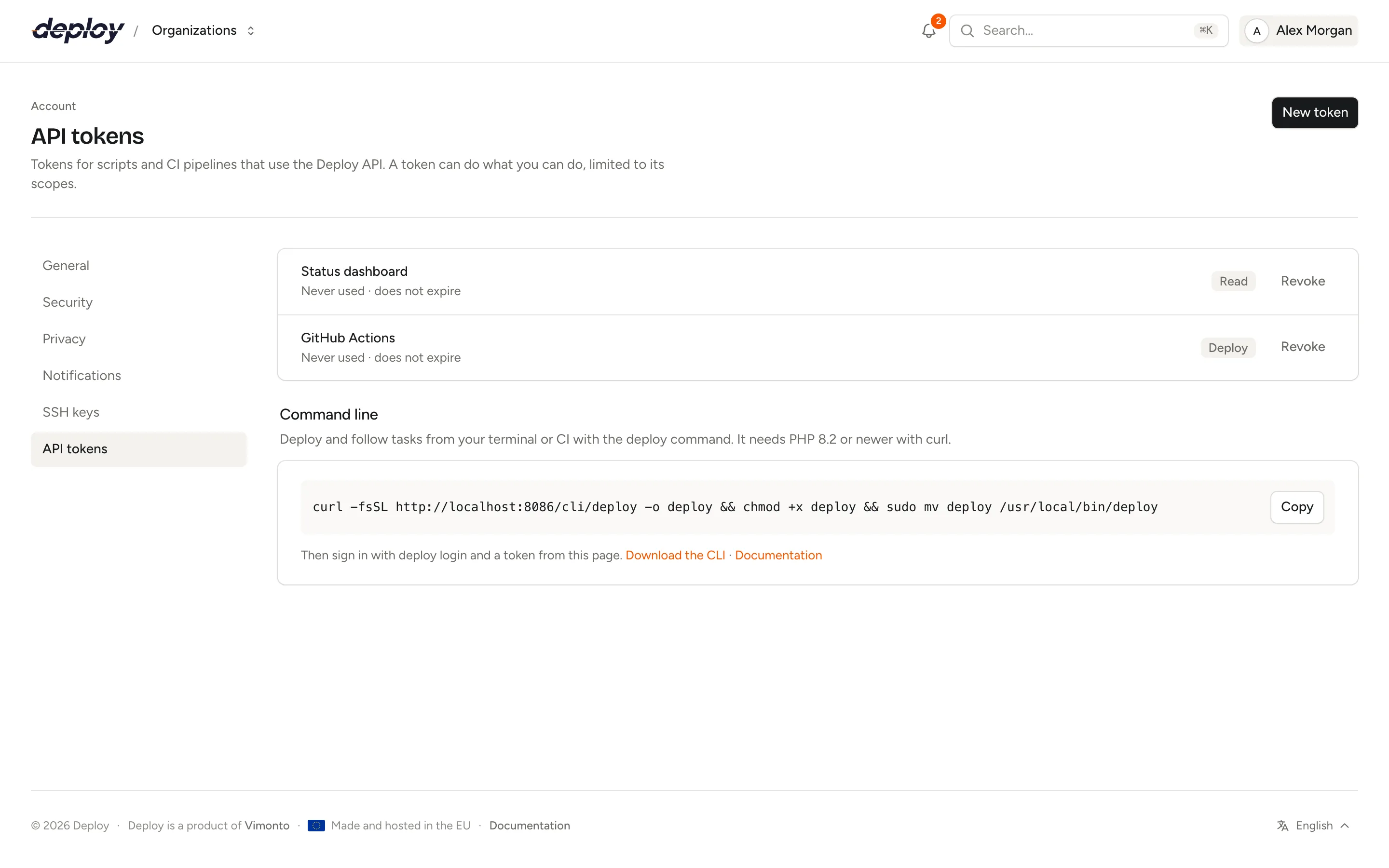
Create an API token
- Open the account menu at the top right and choose Account settings → API tokens.
- Click New token.
- Enter a Name that says where it is used, such as "GitHub Actions".
- Under Scopes, check what the token may do (see below).
- Under Expires, choose In 30 days, In 90 days (the default), In 365 days or Never.
- Click Create token.
The token is shown once, under Your new token. Click Copy and store it somewhere safe, such as your CI's secrets; Vimonto Deploy only keeps a hash of it and can't show it again. A token looks like 12| followed by a long string of letters and digits.
The list shows each token's name, when it was last used, when it expires and its scopes. Click Revoke to delete a token: scripts and pipelines that use it stop working straight away. Deleting your account revokes all your tokens.
Scopes
| Scope | Value | Allows |
|---|---|---|
| Read | read |
View servers, sites, deployments, databases, backups, recipes and tasks. |
| Deploy | deploy |
Start deployments and follow them: find a site by domain or ID, list and view deployments and view tasks. Meant for CI pipelines. |
| Write | write |
Everything Read allows, plus starting deployments, creating and removing databases, and running backups and recipes. |
A token with only Deploy can look up the site it deploys (see find a site) but can't list servers or sites: give a CI pipeline just that scope, and use Read or Write for scripts that need more.
The scope is the first check. Your role is the second: starting a deploy, changing databases and running backups or recipes need the owner, administrator, manager or developer role. A viewer's token can read, but every change is refused with 403.
Base URL and authentication
All endpoints are under /api/v1 on the address where you use Vimonto Deploy. In the examples below that is https://deploy.example.com/api/v1; replace deploy.example.com with your own address.
Send the token as a bearer token in the Authorization header, and ask for JSON:
curl https://deploy.example.com/api/v1/user \
  -H "Authorization: Bearer $VIMONTO_TOKEN" \
  -H "Accept: application/json"
Only tokens open the API: being signed in to the app in your browser does not. Request bodies are JSON (Content-Type: application/json). Dates are ISO 8601 with a time zone. Messages in responses, such as errors, are in the language set in your account; when you haven't chosen one, in the language of the request's Accept-Language header (English, Dutch, German, French or Italian), else in English.
Organizations, servers and sites in the URL
Organization endpoints start with /orgs/{organization}, where {organization} is the organization's slug: the first part of its address in the app (https://deploy.example.com/acme/… has the slug acme). GET /user lists the slugs your token can reach.
Servers, sites and everything below them are addressed by their numeric ID, the same number as in the app's address: /acme/servers/12/sites/34 in the app is /orgs/acme/servers/12/sites/34 in the API. A child must belong to its parent: site 34 on server 12 only works if the site is on that server, or the API answers 404.
An organization you're not a member of, and a server your teams don't give you access to, answer 404, not 403.
Endpoints
| Method | Path | Scopes |
|---|---|---|
GET |
/user |
any |
GET |
/orgs/{organization}/servers |
read, write |
GET |
/orgs/{organization}/servers/{server} |
read, write |
GET |
/orgs/{organization}/servers/{server}/sites |
read, write |
GET |
/orgs/{organization}/servers/{server}/sites/{site} |
read, write |
GET |
/orgs/{organization}/sites |
read, deploy, write |
GET |
/orgs/{organization}/servers/{server}/sites/{site}/deployments |
read, deploy, write |
GET |
/orgs/{organization}/servers/{server}/sites/{site}/deployments/{deployment} |
read, deploy, write |
POST |
/orgs/{organization}/servers/{server}/sites/{site}/deployments |
deploy, write |
GET |
/orgs/{organization}/servers/{server}/databases |
read, write |
POST |
/orgs/{organization}/servers/{server}/databases |
write |
DELETE |
/orgs/{organization}/servers/{server}/databases/{database} |
write |
GET |
/orgs/{organization}/servers/{server}/backups |
read, write |
POST |
/orgs/{organization}/servers/{server}/backups/{backup}/run |
write |
GET |
/orgs/{organization}/recipes |
read, write |
POST |
/orgs/{organization}/recipes/{recipe}/run |
write |
GET |
/orgs/{organization}/tasks/{task} |
read, deploy, write |
A token needs one of the listed scopes. Paths below leave out the https://deploy.example.com/api/v1 prefix.
Get the token's user
GET /user returns who the token belongs to, the token's name and scopes, and the organizations it can reach with your role in each. Every scope may call it, so it is a good first test of a token.
curl https://deploy.example.com/api/v1/user \
  -H "Authorization: Bearer $VIMONTO_TOKEN" -H "Accept: application/json"
{
  "data": {
    "id": 7,
    "name": "Sam de Vries",
    "email": "sam@example.com",
    "token": {
      "name": "GitHub Actions",
      "scopes": ["deploy"]
    },
    "organizations": [
      { "slug": "acme", "name": "Acme", "role": "developer" }
    ]
  }
}
List servers
GET /orgs/{organization}/servers returns the organization's servers that you have access to, sorted by name. GET /orgs/{organization}/servers/{server} returns one server.
curl https://deploy.example.com/api/v1/orgs/acme/servers \
  -H "Authorization: Bearer $VIMONTO_TOKEN" -H "Accept: application/json"
{
  "data": [
    {
      "id": 12,
      "name": "web-1",
      "type": "app",
      "status": "active",
      "provider": "hetzner",
      "region": "fsn1",
      "size": "cx32",
      "ip_address": "203.0.113.10",
      "private_ip_address": "10.0.0.2",
      "ssh_port": 22,
      "user": "vimonto",
      "php_version": "8.4",
      "database": "mysql-8.4",
      "ubuntu_version": "24.04",
      "timezone": "UTC",
      "tags": ["production"],
      "created_at": "2026-09-01T09:30:00+00:00"
    }
  ]
}
| Field | Values |
|---|---|
type |
app, web, worker, database, cache, meilisearch, loadbalancer |
status |
creating, waiting, provisioning, active, failed, disconnected, deleting |
provider |
The cloud provider, or custom for a custom VPS. |
database |
mysql-8.4, mysql-8.0, mariadb-11.4, mariadb-10.11, postgres-18, postgres-17, postgres-16, or null |
Secrets such as passwords and keys are never part of a response.
List sites
GET /orgs/{organization}/servers/{server}/sites returns the server's sites, sorted by domain. GET /orgs/{organization}/servers/{server}/sites/{site} returns one site.
{
  "data": {
    "id": 34,
    "server_id": 12,
    "domain": "shop.example.com",
    "aliases": ["www.shop.example.com"],
    "preview_domain": "kalme-rivier-4821.on-deploy.link",
    "framework": "laravel",
    "status": "installed",
    "php_version": "8.4",
    "repository": "acme/shop",
    "branch": "main",
    "quick_deploy": true,
    "zero_downtime": true,
    "isolated": false,
    "current_release": "20261007143012",
    "deployed_at": "2026-10-07T14:31:40+00:00",
    "created_at": "2026-09-01T10:02:11+00:00"
  }
}
framework is one of laravel, symfony, statamic, wordpress, phpmyadmin, php, nextjs, nuxt, html, other and loadbalancer. status is installed when the site is ready; while it changes it is installing, updating or removing, and failed when that went wrong. quick_deploy is push to deploy; isolated says whether the site runs as its own Linux user. The site's environment file and deploy URL are never returned.
Find a site
GET /orgs/{organization}/sites returns the sites on every server you have access to, sorted by domain, each with its server (ID and name). The other fields are the same as above. Narrow the list down with query parameters:
| Parameter | Matches |
|---|---|
domain |
The site's domain, not case-sensitive. |
id |
The site's ID. |
server |
The server's ID or name. |
curl "https://deploy.example.com/api/v1/orgs/acme/sites?domain=shop.example.com" \
  -H "Authorization: Bearer $VIMONTO_TOKEN" -H "Accept: application/json"
{
  "data": [
    {
      "id": 34,
      "server_id": 12,
      "server": { "id": 12, "name": "web-1" },
      "domain": "shop.example.com",
      "status": "installed",
      "branch": "main"
    }
  ]
}
A token with only the Deploy scope may call it too, to find the site it deploys, but must pass domain or id; without one the answer is 422. When nothing matches, data is an empty list.
List deployments
GET /orgs/{organization}/servers/{server}/sites/{site}/deployments returns the site's deployments, newest first, 25 per page (see pagination). GET …/deployments/{deployment} returns one.
{
  "data": {
    "id": 581,
    "site_id": 34,
    "status": "succeeded",
    "trigger": "api",
    "branch": "main",
    "commit": {
      "hash": "9f2c4e1a7b3d5f60812a9c4e7d1b3a5c7e9f1a2b",
      "author": "Sam de Vries",
      "message": "Add checkout page"
    },
    "release": "20261007143012",
    "task_id": 9120,
    "started_at": "2026-10-07T14:30:12+00:00",
    "finished_at": "2026-10-07T14:31:40+00:00",
    "created_at": "2026-10-07T14:30:11+00:00"
  }
}
| Field | Values |
|---|---|
status |
queued, running, succeeded, failed, cancelled |
trigger |
manual, push, url (the deploy URL), rollback, api |
commit |
null until the code has been fetched. |
release |
The release directory, or live for a site without zero-downtime deploys; null until the deploy has started. |
Start a deployment
POST /orgs/{organization}/servers/{server}/sites/{site}/deployments deploys the site's branch, exactly like Deploy now in the app. It takes no body. It answers 202 Accepted with the new deployment; follow it with its task_id.
curl -X POST https://deploy.example.com/api/v1/orgs/acme/servers/12/sites/34/deployments \
  -H "Authorization: Bearer $VIMONTO_TOKEN" -H "Accept: application/json"
{
  "data": {
    "id": 582,
    "site_id": 34,
    "status": "queued",
    "trigger": "api",
    "branch": "main",
    "commit": null,
    "release": null,
    "task_id": 9121,
    "started_at": null,
    "finished_at": null,
    "created_at": "2026-10-07T15:02:45+00:00"
  }
}
409when a deploy of the site is already running;task_idin the response is the running task.422when the site isn't ready to deploy yet or has no repository.
See deployments for what a deploy does.
List and create databases
GET /orgs/{organization}/servers/{server}/databases returns the server's databases, sorted by name.
{
  "data": [
    { "id": 3, "server_id": 12, "name": "shop", "status": "installed", "created_at": "2026-09-01T10:05:00+00:00" }
  ]
}
POST /orgs/{organization}/servers/{server}/databases creates a database on the server. The body has one field:
| Field | Rules |
|---|---|
name |
Required. 1 to 63 letters, digits and underscores, unique on the server. |
curl -X POST https://deploy.example.com/api/v1/orgs/acme/servers/12/databases \
  -H "Authorization: Bearer $VIMONTO_TOKEN" -H "Accept: application/json" \
  -H "Content-Type: application/json" \
  -d '{"name": "shop_staging"}'
{
  "data": { "id": 4, "server_id": 12, "name": "shop_staging", "status": "installing", "created_at": "2026-10-07T15:10:00+00:00", "task_id": 9122 }
}
The answer is 202: the database is made by a task on the server. Its status is installing, then installed, or failed when the task fails. The server must be active and have a database installed, or the answer is 422.
Delete a database
DELETE /orgs/{organization}/servers/{server}/databases/{database} drops the database on the server. It answers 202 with the database, now removing, and the task that removes it in task_id, inside data like every endpoint that starts a task:
{
  "data": { "id": 4, "server_id": 12, "name": "shop_staging", "status": "removing", "created_at": "2026-10-07T15:10:00+00:00", "task_id": 9123 }
}
See databases.
List backups and run one
GET /orgs/{organization}/servers/{server}/backups returns the server's backup configurations, sorted by name, each with its 20 latest backups. size is in bytes.
{
  "data": [
    {
      "id": 2,
      "name": "Nightly",
      "databases": ["shop"],
      "frequency": "nightly",
      "schedule": "0 0 * * *",
      "retention": 7,
      "storage": "Backups bucket",
      "backups": [
        {
          "id": 140,
          "status": "succeeded",
          "size": 48213504,
          "databases": ["shop"],
          "task_id": 9050,
          "created_at": "2026-10-07T00:00:02+00:00",
          "finished_at": "2026-10-07T00:01:15+00:00"
        }
      ]
    }
  ]
}
frequency is minute, hourly, nightly, weekly, monthly, reboot or custom; schedule is the cron expression. A backup's status is running, succeeded or failed.
POST /orgs/{organization}/servers/{server}/backups/{backup}/run, with the ID of a backup configuration, starts a backup now. It takes no body and answers 202:
{ "data": { "backup_id": 141, "task_id": 9124 } }
409 when a backup of that configuration is already running. See backups.
List recipes and run one
GET /orgs/{organization}/recipes returns the organization's recipes, sorted by name. run_as is root or server_user.
{
  "data": [
    { "id": 5, "name": "Install htop", "run_as": "root", "script": "apt-get install -y htop", "updated_at": "2026-09-20T08:12:00+00:00" }
  ]
}
POST /orgs/{organization}/recipes/{recipe}/run runs a recipe on one or more servers.
| Field | Rules |
|---|---|
servers |
Required. A list of server IDs, at least one. |
notify |
Optional, true or false (default). true emails you a report when every server is done. |
curl -X POST https://deploy.example.com/api/v1/orgs/acme/recipes/5/run \
  -H "Authorization: Bearer $VIMONTO_TOKEN" -H "Accept: application/json" \
  -H "Content-Type: application/json" \
  -d '{"servers": [12, 13], "notify": false}'
{
  "data": {
    "run_id": 77,
    "servers": [
      { "server_id": 12, "task_id": 9125 },
      { "server_id": 13, "task_id": 9126 }
    ]
  }
}
Every server you name must exist, be one you have access to and be active. Otherwise the recipe runs nowhere and the answer is 422: errors.servers lists the server IDs that don't exist or that you have no access to, or names the servers that aren't active. The response lists each server with its own task. See recipes.
Follow a task
Long work (a deploy, a database, a backup, a recipe on a server) runs as a background task, the same one you see under activity. GET /orgs/{organization}/tasks/{task} returns its state and output:
{
  "data": {
    "id": 9121,
    "type": "site.deploy",
    "name": "Deploying to shop.example.com",
    "status": "running",
    "step": "Run deploy script",
    "progress": 30,
    "error": null,
    "server_id": 12,
    "output": "Cloning into 'releases/20261007150246'...\n",
    "started_at": "2026-10-07T15:02:46+00:00",
    "finished_at": null,
    "created_at": "2026-10-07T15:02:45+00:00"
  }
}
status is queued, running, succeeded, failed or cancelled; the last three are final. progress goes from 0 to 100. When a task fails, error says why. Poll every few seconds until the status is final.
Pagination
Only the deployments list is paginated, with 25 deployments per page, newest first. Ask for another page with ?page=2. The response has links and meta next to data:
{
  "data": [ … ],
  "links": {
    "first": "https://deploy.example.com/api/v1/orgs/acme/servers/12/sites/34/deployments?page=1",
    "last": "https://deploy.example.com/api/v1/orgs/acme/servers/12/sites/34/deployments?page=4",
    "prev": null,
    "next": "https://deploy.example.com/api/v1/orgs/acme/servers/12/sites/34/deployments?page=2"
  },
  "meta": {
    "current_page": 1,
    "from": 1,
    "last_page": 4,
    "path": "https://deploy.example.com/api/v1/orgs/acme/servers/12/sites/34/deployments",
    "per_page": 25,
    "to": 25,
    "total": 92
  }
}
meta also holds a links list for page buttons. Follow links.next until it is null. All other lists return everything in one response.
Errors
Errors are JSON with a message:
{ "message": "shop.example.com is not ready to deploy yet." }
| Status | Meaning |
|---|---|
401 |
No token, a wrong or revoked token, or an expired one: {"message": "Unauthenticated."} |
403 |
The token lacks the scope ("Invalid ability provided."), or your role does not allow the change ("Your role does not allow this."). |
404 |
The organization, server, site or other item doesn't exist, or you have no access to it. Don't rely on the message. |
409 |
The same work is already running. The response holds the running task's task_id. |
422 |
The request can't be done: invalid fields, or a reason such as a server that isn't ready yet. |
429 |
Too many requests; see rate limits. |
A 409 looks like this:
{ "message": "Deploying to shop.example.com is already running.", "task_id": 9121 }
A 422 for invalid fields lists them under errors:
{
  "message": "The name field format is invalid.",
  "errors": {
    "name": ["The name field format is invalid."]
  }
}
Rate limits
Each token may make 120 requests a minute. Every response has X-RateLimit-Limit and X-RateLimit-Remaining headers. Above the limit, the API answers 429 with a Retry-After header: the number of seconds to wait.
When you poll a task, once every few seconds is plenty.
Deploy from GitHub Actions
This workflow deploys after the tests pass and fails when the deploy fails. Create a token with only the Deploy scope and add it to the repository's secrets as VIMONTO_TOKEN (Settings → Secrets and variables → Actions at GitHub). Fill in your own address, organization slug, server ID and site ID.
name: Deploy

on:
  push:
    branches: [main]

jobs:
  deploy:
    runs-on: ubuntu-latest
    # needs: tests   # deploy only after your test job passes
    steps:
      - name: Deploy to production
        env:
          VIMONTO_TOKEN: ${{ secrets.VIMONTO_TOKEN }}
          API: https://deploy.example.com/api/v1/orgs/acme
          SERVER: 12
          SITE: 34
        run: |
          set -euo pipefail
          auth=(-H "Authorization: Bearer $VIMONTO_TOKEN" -H "Accept: application/json")

          # Start the deploy; curl fails on 4xx/5xx, such as 409 when one is already running.
          task=$(curl -sS --fail-with-body -X POST "${auth[@]}" \
            "$API/servers/$SERVER/sites/$SITE/deployments" | jq -r '.data.task_id')
          echo "Deploy started, task $task"

          # Follow the task until it is done.
          while true; do
            sleep 5
            response=$(curl -sS --fail-with-body "${auth[@]}" "$API/tasks/$task")
            status=$(echo "$response" | jq -r '.data.status')
            echo "Status: $status ($(echo "$response" | jq -r '.data.step // ""'))"
            case "$status" in
              succeeded) exit 0 ;;
              failed|cancelled)
                echo "$response" | jq -r '.data.error // "", .data.output'
                exit 1 ;;
            esac
          done
Turn off Deploy on every push for the site when CI deploys it. Otherwise a push starts a deploy by itself, and the pipeline's request then gets 409 because a deploy is already running.
Or use the CLI
The Vimonto Deploy CLI wraps these requests in one command: deploy deploy shop.example.com --watch starts the deploy, follows the task and exits with its result. In CI it reads the token from DEPLOY_TOKEN.
Or use the deploy URL
When you only need to start a deploy, the site's secret Deploy URL is simpler: one POST without a token, and nothing to follow. It doesn't tell your pipeline whether the deploy succeeded. See deployments.
Frequently asked questions
Is a token tied to one organization?
No. A token reaches every organization you are a member of, with your role in each. GET /user lists them. Make a separate account if a pipeline should only reach one organization.
What happens to my tokens when my role changes?
A token always follows your current role and server access. When you lose a permission or leave an organization, the token loses it too, straight away.
Can I create servers or sites through the API?
Not yet. The API covers reading servers, sites, deployments, databases, backups, recipes and tasks; deploying; creating and removing databases; and running backups and recipes.
Where do I find the server and site ID?
In the address bar of the app: on a site's pages the address is /{organization}/servers/{server}/sites/{site}/…. GET /orgs/{organization}/servers and GET …/servers/{server}/sites list them too, and GET /orgs/{organization}/sites?domain=shop.example.com finds a site with its server ID by its domain.