

The Scheduler page of a server manages its scheduled jobs: commands that cron runs at set times, such as every minute, every night or on the first of the month. Use it for the Laravel scheduler, for cleanup scripts, for reports or for anything else that should run on a schedule and then exit.
Each job is written to its own file in /etc/cron.d on the server, so jobs can be added and removed independently without touching anyone's crontab. Schedules follow the server's timezone, which is shown at the top of the page and can be changed in the server settings.
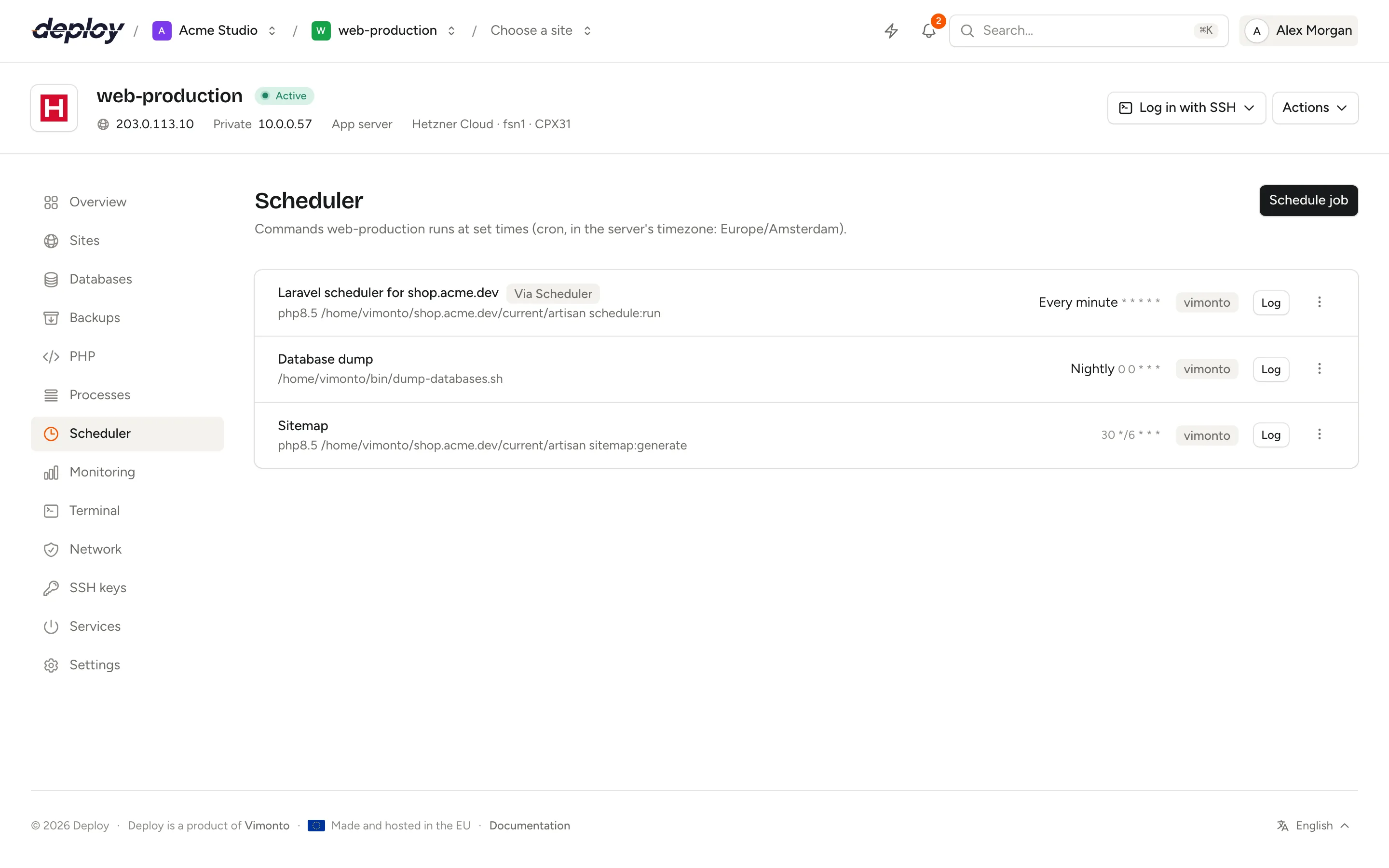
Schedule a job
- Open the server and choose Scheduler in the sidebar.
- Click Schedule job.
- Enter the Command, for example
php /home/vimonto/example.com/current/artisan schedule:run. - Optionally enter a Name, to recognise the job in the list.
- Choose who it runs as under Run as: the system user (
vimontoby default) orroot. - Choose When it runs (see below).
- Click Schedule job.
The job shows as Adding until its cron file is written, then it runs at its next scheduled time.
The command runs through bash, so pipes, && and variables work as you type them. Cron's own special characters, such as %, need no escaping.
Which frequencies can you choose?
| Frequency | Cron expression | Runs |
|---|---|---|
| Every minute | * * * * * |
Every minute. |
| Hourly | 0 * * * * |
At the start of every hour. |
| Nightly | 0 0 * * * |
Every day at midnight. |
| Weekly | 0 0 * * 0 |
Every Sunday at midnight. |
| Monthly | 0 0 1 * * |
On the first of every month at midnight. |
| On reboot | @reboot |
Once, every time the server starts. |
| Custom schedule | your own | Whatever you enter under Schedule. |
Write a custom cron expression
Choose Custom schedule and enter five fields under Schedule: minute, hour, day of the month, month and day of the week. Each field accepts *, a number, a range (1-5), a step (*/15) and lists separated by commas.
| Expression | Runs |
|---|---|
*/15 * * * * |
Every 15 minutes. |
30 3 * * * |
Every night at 3:30. |
0 9 * * 1-5 |
At 9:00 on weekdays. |
0 */6 * * * |
Every six hours. |
0 2 1,15 * * |
At 2:00 on the 1st and the 15th of the month. |
Names such as MON or JAN and shortcuts such as @daily are not accepted in a custom schedule; use numbers instead.
Run the Laravel scheduler
Laravel's scheduler needs one cron job that runs schedule:run every minute. The easiest way is to switch on the scheduler for the site on its queues and scheduler page: Vimonto Deploy then creates the job for you, with the right path and user, and it appears in this list.
To add it by hand instead, schedule this command Every minute as the system user:
php /home/vimonto/example.com/current/artisan schedule:run
Use the site's current directory so the job always runs the code that is live. A job the site created this way is marked Via Scheduler; see Jobs made by site features.
Run a job now
Open the actions menu (⋯) of a job and choose Run now. The command runs immediately as the job's user, from that user's home directory. Its output appears in the task on the activity page, which makes this the easiest way to test a new job.
Read the log
Click Log next to a job to see the last 300 lines its scheduled runs printed (standard output and errors together), fetched from the server when you click. Every run appends its output to /var/log/vimonto/cron-{id}.log, under a line with the date and time it started, such as --- 2026-10-07T03:30:00+02:00. A job that prints nothing leaves only that line, so you can still see that it ran.
Once a day, a log larger than 5 MB is moved aside: one older file is kept and anything older is deleted, so a chatty job cannot fill the disk. The log is deleted when you remove the job. Output of Run now is not written to the log; it is in the task on the activity page.
What are the default jobs?
Every server is provisioned with two jobs, marked Default:
| Job | When | What it does |
|---|---|---|
| Update Composer | Nightly | Updates Composer to its latest version. |
| Clean up unused packages | Weekly | Removes packages and cached package files the server no longer needs. |
Both run as root. You can edit, run or remove them like any other job.
Edit or remove a job
Open the actions menu (⋯) and choose Edit to change the command, name, user or schedule; Save rewrites the cron file. Choose Remove to delete the job; it will no longer run.
If writing a job fails, it shows Failed; choose Try again in the actions menu.
Jobs made by site features
Jobs that a site feature created, such as the Laravel scheduler or Real cron for WordPress, are marked with a Via … badge, for example Via Scheduler. You can read their Log and Run now here, but Edit, Try again and Remove are not offered: change them through the feature in the site header, and switch the feature off to remove its job.
Know when a scheduled job stops running
Cron does not tell you when a job fails or stops running. Use a heartbeat for that: click Add heartbeat on the monitoring page, then have the job call the heartbeat's URL when it finishes, for example by ending the command with && curl -fsS https://… (the URL shown for the heartbeat). If the ping does not come within the interval and grace period you set, Vimonto Deploy emails the address under Notify and notifies the organization's members, one email per person; see who gets notified.
Frequently asked questions
In which timezone do jobs run?
In the server's timezone, shown at the top of the Scheduler page. Change it in the server settings; jobs then follow the new timezone.
Why doesn't my job run?
Open its Log to see what the last scheduled runs printed, or click Run now and read the output on the activity page. Common causes are a relative path (use full paths, or cd into the directory first), a command that needs another user, or a custom schedule that is not what you meant. Cron uses a short PATH (/usr/local/sbin, /usr/local/bin, /usr/sbin, /usr/bin, /sbin and /bin).
What is the difference between a scheduled job and a process?
A scheduled job starts at set times and exits when it is done. A process runs all the time and is restarted by Supervisor when it stops. Use a process for queue workers, and a scheduled job for tasks such as the Laravel scheduler.
Can a job run more often than every minute?
No. Cron's smallest interval is one minute. For work that must run continuously, use a process.