

Load balancing spreads the visitors of one site over several app servers. A load balancer server sits in front: your domain points to it, it answers on HTTP and HTTPS, and Nginx passes every request on to one of the app servers behind it. If an app server stops answering, the others take over.
In Vimonto Deploy, a load balancer is a server of its own with a load-balanced site on it. On that site's Load balancing page you choose the app servers, how traffic is divided between them, and which ones only step in when the others are down.
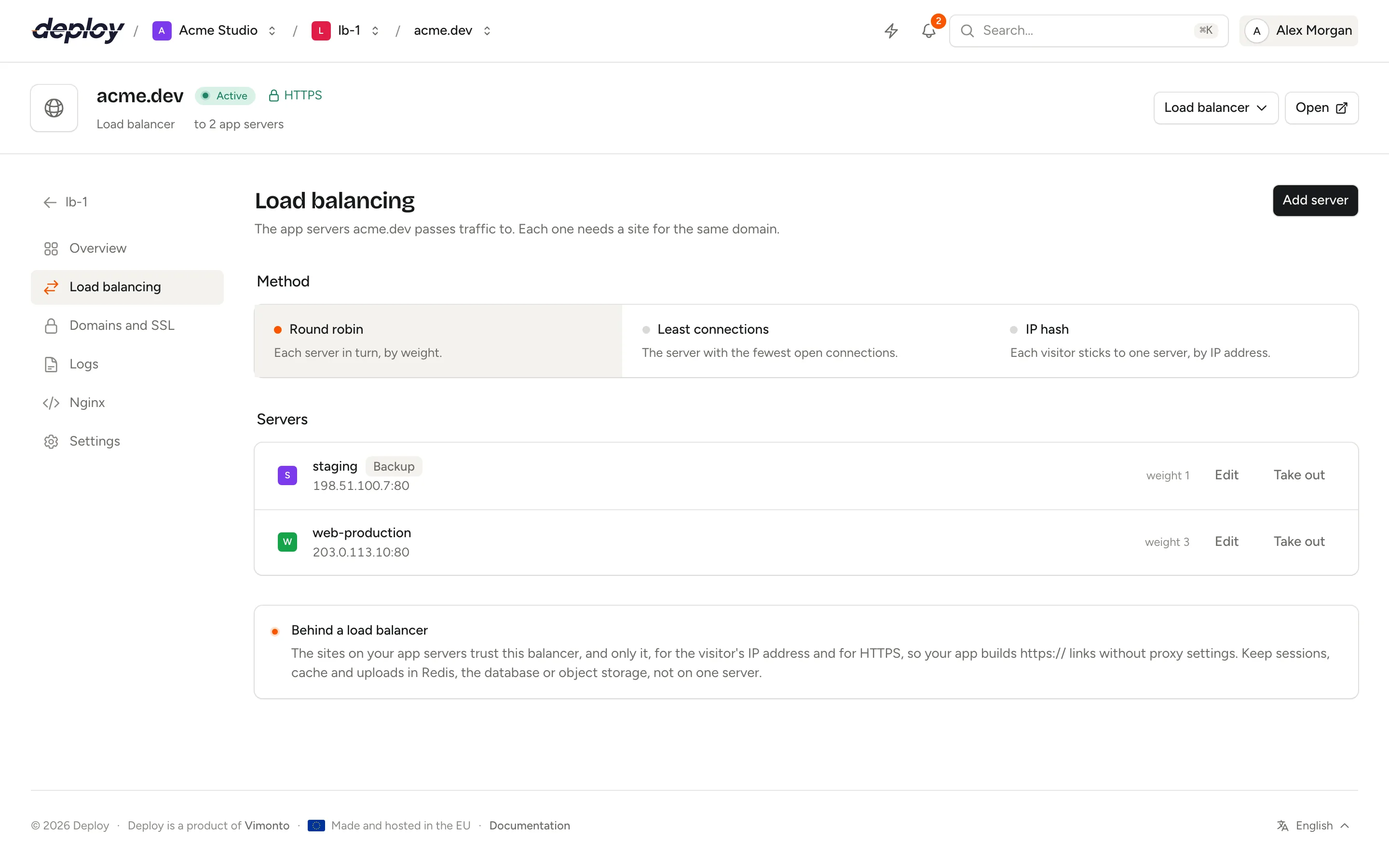
How does load balancing work?
| Part | What it does |
|---|---|
| Load balancer server | A server of the type Load balancer, with only Nginx. Your domain's DNS points to it. |
| Load-balanced site | The site on the load balancer, made from the Load balancer preset. It has the domain, the certificate and the list of app servers, but no code. |
| App servers | App or web servers in your organization, each with a site for the same domain. They run your code and are deployed as usual. |
A visitor connects to the load balancer. Nginx there picks an app server, passes the request on with the original Host and X-Forwarded-* headers, and sends the answer back. The app servers see the visitor's IP address and whether the visitor used HTTPS, because their sites trust this load balancer (see what the app servers need).
Set up a load balancer
- Create a server of the type Load balancer. It gets only Nginx; see server types.
- Make sure each app server has a site for your domain, for example
shop.example.com, and that it is deployed. Use the same domain or add it as an alias under domains and SSL. - On the load balancer's Sites page, click New site and choose Load balancer under Load balancing.
- Enter the same domain with Use a custom domain and click Create site. A load-balanced site has no repository, no database and no deploys.
- Open the new site's Load balancing page and add your app servers (see below).
- Point the domain's DNS to the load balancer's IP address, and turn on HTTPS on the load balancer's site under domains and SSL.
Until you add an app server, the load balancer answers every request with 503 Service Unavailable, and the site's overview says No app servers yet. Visitors get a 503 until you add one.
A load balancer server only holds load-balanced sites, and the Load balancer preset only goes on a load balancer server: the form lists only the servers that fit.
Add an app server
- On the site's Load balancing page, click Add server.
- Choose the Server. The list holds the active app and web servers of your organization that you have access to.
- Set the Port the app server's site listens on:
80by default. - Set the Weight, from 1 to 100: a server with weight 3 gets three times as many requests as one with weight 1.
- Switch on Backup server if this server should only get traffic when the other servers are down.
- Click Add server.
The load balancer reaches the app server over the private network when both servers are on the same one, and over its public IP address otherwise. The Servers list shows each app server with the address and port the load balancer uses, its weight and a Backup badge.
A server can be added more than once, on different ports.
Edit an app server
Click Edit next to the server, change its Port, Weight or Backup server setting and click Save. The server itself stays the same; to use another one, add it and take this one out. The change is applied right away.
Choose the balancing method
Under Method, click one of the three options. The change is applied right away.
| Method | How Nginx picks an app server |
|---|---|
| Round robin (default) | Each server in turn, by weight. |
| Least connections | The server with the fewest open connections, for requests that take very different amounts of time. |
| IP hash | Each visitor sticks to one server, by IP address. Use it only when your app keeps something on one server. |
Nginx does not accept backup servers together with IP hash, so Vimonto Deploy does not let you combine them. With IP hash chosen, Backup server cannot be switched on and the form says IP hash can't use backup servers. Choose another method first. With a backup server in the list, choosing IP hash is refused with IP hash can't use backup servers: edit your backup servers first so they are no longer backups.
What happens when an app server goes down?
The load balancer checks the app servers through the requests it sends; there are no separate health checks. When a request to an app server fails with a connection error, a timeout or a 502, 503 or 504, Nginx tries the next server, so the visitor still gets an answer. After 3 failures within 10 seconds, the server gets no traffic for 10 seconds, and then Nginx tries it again.
Backup servers only get traffic when every other server is unavailable.
Take an app server out
Click Take out next to the server and confirm. The load balancer stops sending traffic to it, and the sites on that server stop trusting the load balancer (see below). Nothing else changes on the server, and its site keeps working on its own address.
The same cleanup happens on its own when you delete the load-balanced site or the load balancer server: the sites on the app servers stop trusting it. When you delete an app server, the load balancer stops sending traffic to it.
What do the app servers need?
Every change on the Load balancing page also writes the Nginx configuration of the sites on the app servers that serve the same domain. Those sites then trust the load balancer, and only it:
- The visitor's IP address. Nginx takes the address from
X-Forwarded-For, but only when the request comes from the load balancer (set_real_ip_from). Your app sees the visitor's IP address as the remote address, without proxy settings of its own. - HTTPS. When the load balancer received the request over HTTPS, PHP gets
HTTPS=onand a Node.js app getsX-Forwarded-Proto: https. Laravel and other frameworks then buildhttps://links without trusted-proxy configuration.
Requests from anywhere else cannot fake these headers. Taking a server out, or deleting the load-balanced site or the load balancer, removes the trust again. A site with a custom Nginx configuration is left alone; add these lines yourself.
Your app also has to work on several servers at once:
- Keep sessions and cache in Redis or the database, on a shared database or cache server, not in files on one server. For Laravel that means
SESSION_DRIVERandCACHE_STOREset toredisordatabasein the .env of every app server, pointing to the same Redis or database. - Keep uploads in object storage such as S3, not in
storage/of one server. - Deploy each app server's site. Every app server has its own release and deploy, so deploy them all when you release a new version.
- Run the scheduler on one app server only, unless your scheduled tasks are safe to run more than once.
HTTPS belongs on the load balancer, which talks plain HTTP to the app servers. A site on an app server may still have a certificate of its own, for example to reach it directly: it redirects plain HTTP to HTTPS for everyone except the load balancer, which it serves over plain HTTP, so there is no redirect loop.
HTTPS on the load balancer
The load-balanced site has its own Domains and SSL page. Because your domain points to the load balancer, a free Let's Encrypt certificate is requested there, as for any site, and renews automatically. The load balancer then answers on HTTPS, redirects HTTP to HTTPS and passes the requests on to the app servers over HTTP, with X-Forwarded-Proto: https.
Traffic between the load balancer and the app servers is not encrypted. Put them on the same private network so it stays inside your provider's network.
What the Nginx configuration looks like
The load-balanced site's configuration has an upstream block with the app servers and a location that passes requests to it:
upstream site_7_servers {
    least_conn;
    server 10.0.0.3:80 weight=3 max_fails=3 fail_timeout=10s;
    server 10.0.0.4:80 max_fails=3 fail_timeout=10s backup;
    keepalive 32;
}

server {
    # listen, server_name, certificate and logs as for every site

    location / {
        proxy_pass http://site_7_servers;
        proxy_http_version 1.1;
        proxy_set_header Host $host;
        proxy_set_header X-Real-IP $remote_addr;
        proxy_set_header X-Forwarded-For $proxy_add_x_forwarded_for;
        proxy_set_header X-Forwarded-Proto $scheme;
        proxy_set_header X-Forwarded-Host $host;
        proxy_set_header X-Forwarded-Port $server_port;
        proxy_set_header Upgrade $http_upgrade;
        proxy_set_header Connection $connection_upgrade_keepalive;
        proxy_next_upstream error timeout http_502 http_503 http_504;
        proxy_read_timeout 120;
    }
}
Connections to the app servers are kept open and reused, and WebSocket connections are passed through. Every change is written as a background task, tested with nginx -t and only then loaded; if Nginx rejects it, the previous configuration stays active. See Nginx.
If you saved a configuration of your own on the load-balanced site's Nginx page, changes on the Load balancing page are saved but not applied: you see Saved, not applied. Restore the default configuration on the Nginx page to use them.
What else does a load-balanced site have?
The sidebar of a load-balanced site shows Overview, Load balancing, Domains and SSL, Logs, Nginx and Settings. It has no Deployments or Environment page, because it has no code. Its Settings page only has Delete site: there is no web directory, deploy setting or isolation to choose. The site header shows how many app servers it passes traffic to.
- Logs shows the load balancer's own Nginx error and request logs. Your app's logs are on the sites of the app servers.
- Password protection, in the framework menu of the site header, protects every app server behind the load balancer at once. It is the only site feature of a load-balanced site.
Every member can see the Load balancing page. Adding, editing and taking out servers and changing the method need the permission to manage sites; see members and roles. Each change is recorded in the audit log.
Frequently asked questions
How many app servers can I put behind a load balancer?
As many as you like. Each one is a line in the upstream block.
Do I need sticky sessions?
Not when sessions are kept in Redis or the database, which every app server reads. Then Round robin or Least connections works best. Use IP hash only when something really lives on one server.
Can I use one load balancer for several domains?
Yes. Create one load-balanced site per domain on the load balancer, each with its own app servers.
Why does my domain show as pointing elsewhere on the app servers?
Because it points to the load balancer, as it should. Only the load balancer's site needs the DNS record and the certificate.