

Uptime monitoring tells you whether your sites are reachable. Every 15 minutes, Vimonto Deploy requests each site's address, the way a visitor would, and records whether it answered. When a site stops answering, you get a notification; when it is back, you get another one.
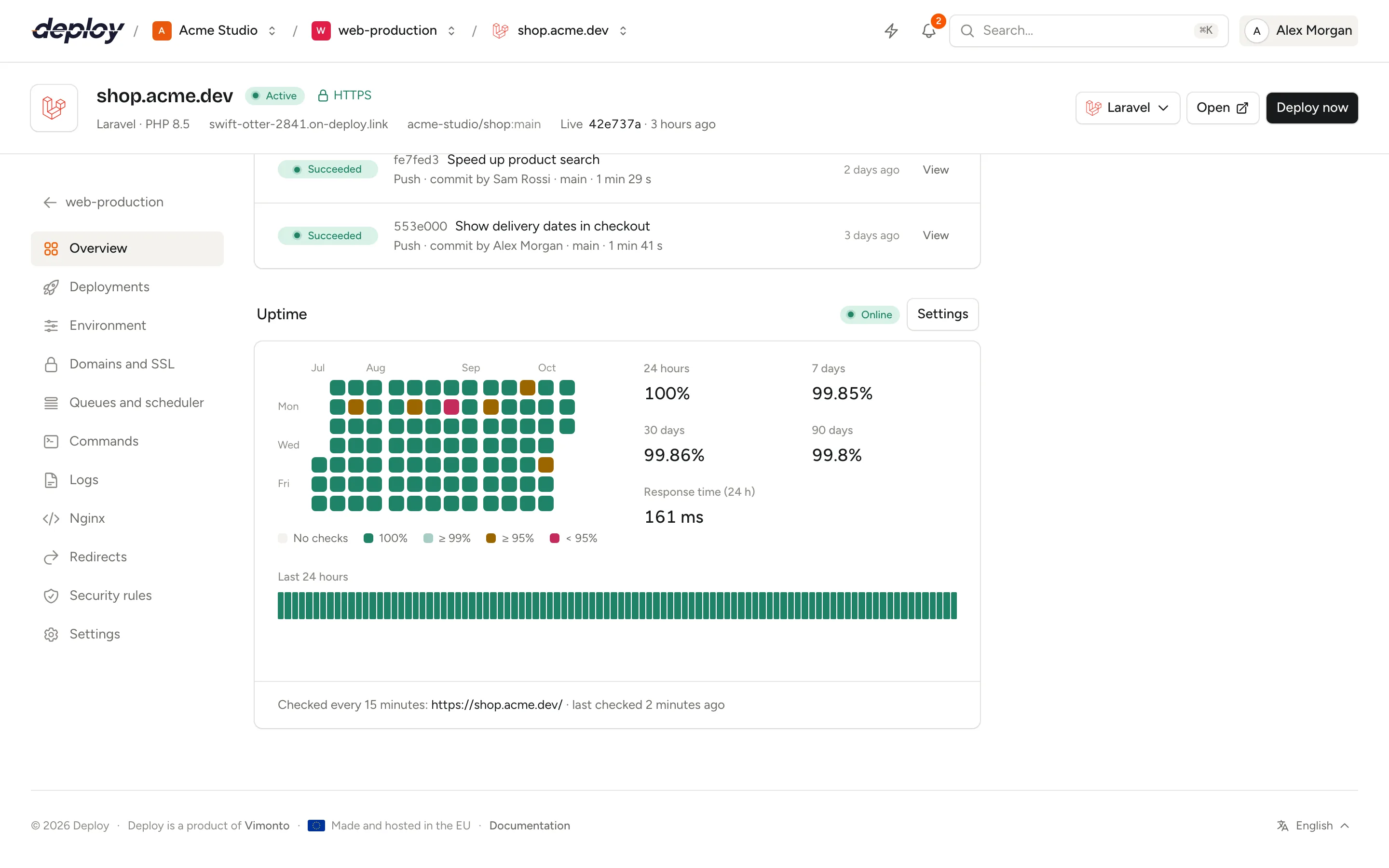
It is on for every site from the start; there is nothing to install on the server. The site's Overview shows the results in the Uptime panel: the current status, the uptime over several periods, a grid of the last 90 days and every check of the last 24 hours.
How are sites checked?
Every 15 minutes, Vimonto Deploy sends a GET request to the site's primary domain plus the Path to check (/ unless you change it):
- Over
https://when the site has an active certificate, otherwise overhttp://. - Redirects are followed, up to five.
- A request that gets no answer within 10 seconds fails.
- The request comes from Vimonto Deploy itself, not from your server, and identifies itself with the user agent
VimontoDeploy-Uptime/1.0. You can recognise it in your access logs, or exclude it from your analytics.
A check is up when the final answer, after the redirects, has a status below 400 (a 2xx or 3xx status). A site that asks every visitor for a password, through the Password protection feature or a security rule for the whole site, answers 401 to the check: for those sites 401 and 403 count as up too, because the site is clearly running.
A check is down when the site answers with any other status (such as 404, 500 or 502), does not answer within 10 seconds, or cannot be reached: the domain name does not resolve, the server refuses the connection, or the HTTPS certificate is invalid or expired.
Vimonto Deploy checks every site whose setup has finished, on servers that are active. Sites that are still being set up, and servers that are being created or are unreachable, are skipped. A load-balanced site is checked through the load balancer's address, so the check follows the same path as your visitors.
When does a site count as down?
One failed check is not enough: a single request can fail for reasons that have nothing to do with your site. A site counts as down after two failed checks in a row, so after 15 to 30 minutes of trouble. It counts as up again after one successful check.
The status at the top of the panel shows where things stand:
| Status | Meaning |
|---|---|
| Online | The last check succeeded. |
| Last check failed | One check failed. The next check decides: if it fails too, the site is down. |
| Offline | Two or more checks in a row failed. The panel shows since when, and why the last check failed. |
| Not checked yet | The site has not been checked yet, for example because it was just created. |
| Off | You switched uptime checks off for this site. |
Read the uptime panel
Next to the status, the panel shows:
- The uptime of the last 24 hours, 7 days, 30 days and 90 days: the share of checks that succeeded. A dash means there were no checks in that period.
- Response time (24 h): the average time the successful checks of the last 24 hours took, in milliseconds.
- At the bottom, the address that is checked and when it was last checked.
The grid of the last 90 days
Like the contribution graph on GitHub, the grid has one square per day: a column per week, Monday at the top. The month names above it show where each month starts. The colour shows the uptime of that day:
| Colour | Uptime that day |
|---|---|
| Grey | No checks |
| Green | 100% |
| Light green | 99% or more |
| Orange | 95% or more |
| Red | Less than 95% |
Hover over a square, or move to it with the Tab key, to see the date, the uptime, the number of checks and the minutes of downtime. Every failed check counts as 15 minutes of downtime: the time until the next check.
The last 24 hours
Below the grid, a strip shows the last 96 checks, one thin bar each, oldest on the left: green when the check succeeded, red when it failed. Hover over a bar to see the time, and the status code and response time, or why the check failed.
Get notified when a site goes down
When a site goes down, Vimonto Deploy sends the Site down notification, with the reason the check failed, such as the status code or "The site did not answer within 10 seconds.". When it is back up, it sends Site back up. Each change sends one notification, not one per check.
Both go to every member who can see the site's server, through the channels each person chose. By default, Site down comes by email and in the app, and Site back up only in the app. Clicking the notification opens the site's overview. To change this, or to mute a server, see notifications.
The sites list and the organization's overview show a dot for each site's status and its uptime over the last 24 hours, so you see at a glance which sites have trouble.
Change what is checked
- Open the site's Overview.
- Click Settings next to Uptime.
- Change the settings and click Save:
- Check this site: switch it off to stop the checks and the notifications for this site. Switched on again, the site starts afresh with Not checked yet.
- Path to check: the path requested on the site's primary domain, such as
/health. It must start with/and cannot contain spaces. A query string, such as/health?full=1, is allowed.
You need permission to manage sites to change these settings. Every member can see the results.
How long are checks kept?
Checks are kept for 90 days, then deleted automatically. The grid always shows the last 90 days.
Frequently asked questions
Why is my site shown as down while it works in my browser?
Look at the reason in the panel. Common causes: the site redirects to a page that returns an error, the path to check no longer exists (404), the HTTPS certificate expired, or a firewall blocks requests from outside your network. Your browser may also show a cached page.
Can I check more often than every 15 minutes?
No. Every site is checked every 15 minutes.
Does the check count in my site's visitor statistics?
It is an ordinary request, so server-side statistics that read the access log will count it. Exclude the user agent VimontoDeploy-Uptime/1.0 to leave it out. Analytics that run in the browser, such as JavaScript trackers, don't see it, because the check doesn't run JavaScript.
Is a site with maintenance mode on down?
Yes, when the app answers 503 while it is in maintenance mode. Switch uptime checks off for the site during planned maintenance if you don't want a notification.