

Site features are ready-made setups for the tools your framework uses, such as Laravel Horizon, Reverb or WordPress's cron. You switch them on from the framework menu in the site header, and Vimonto Deploy configures everything the tool needs on the server: Supervisor processes, cron jobs, Nginx directives and .env values.
Each feature's dialog shows exactly what it will set up before you switch it on, and features are restarted after every deploy where needed. The menu, and the Open button next to it, appear once the site's first setup is done and its first version is live.
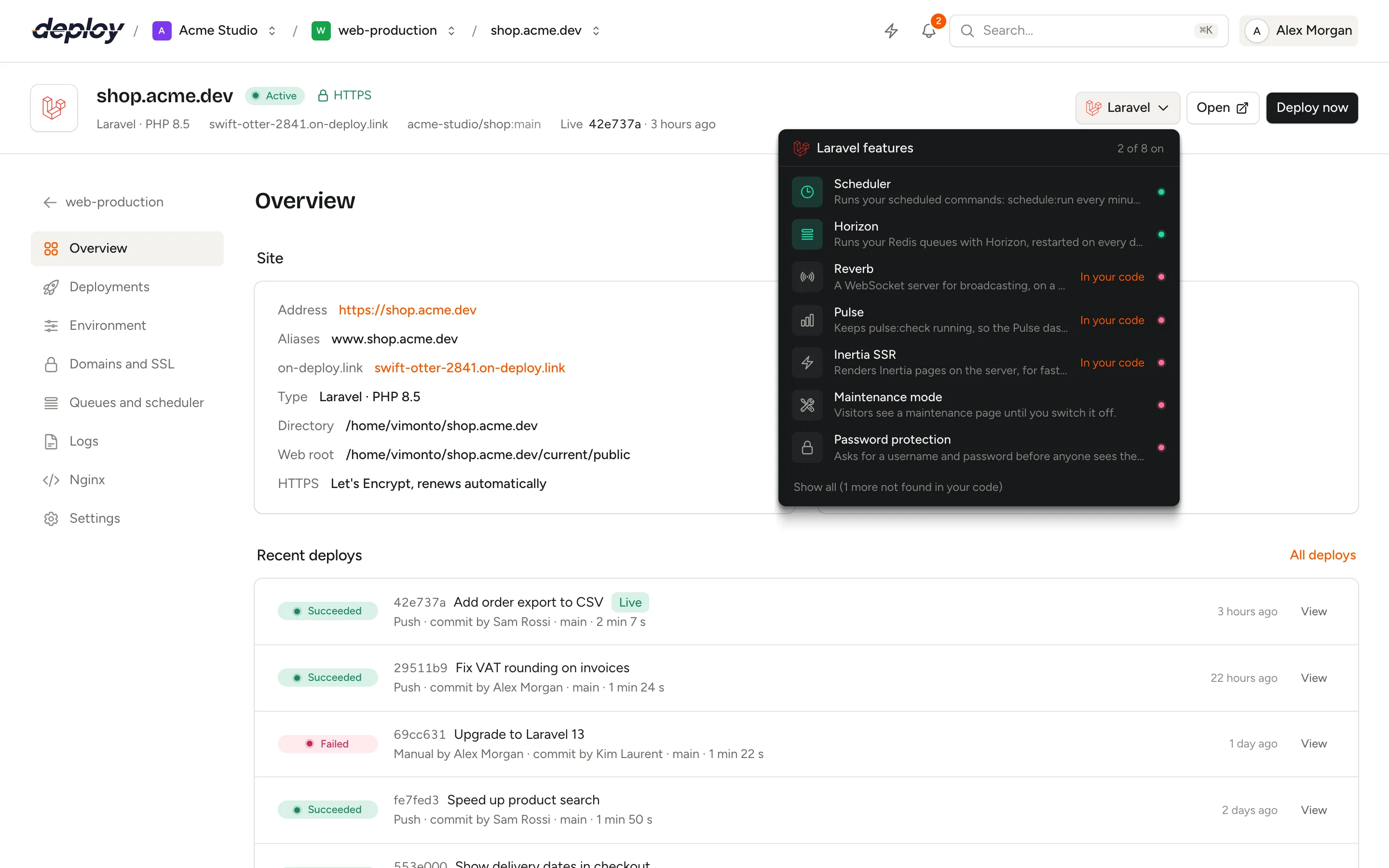
Open the features menu
The menu sits in the site header, named after the site's framework, for example Laravel or WordPress. It opens with the framework's features, such as Laravel features, with a green dot for the ones that are on and a count such as 2 of 7 on.
Vimonto Deploy reads the packages in your composer.json and package.json on every deploy. Features whose package your app uses are marked In your code and listed first, with the features that are already on; the others are behind Show all (… more not found in your code). Until the first deploy, every feature is listed.
Switch a feature on or off
- Click the feature in the menu to open its dialog.
- Fill in its settings, if it has any.
- Check What we set up and We set in your .env. Keys whose value changes are marked changes.
- Click Switch on.
Switching on runs as a background task that you can follow in the site header. If it fails, the feature shows Failed in the menu and you get a notification; open it and click Save to try again, or Try again for a feature without settings, such as the Scheduler or Pulse. Both apply the same settings again. To change the settings of a feature that is on, open it, change them and click Save. To switch it off, open it and click Switch off: its processes, cron jobs and Nginx directives are removed. Values it set in the .env stay.
Features need a site that is set up and, for most, deployed: their commands run in the live release. Features with Nginx directives need the site's generated Nginx configuration, or a custom configuration that keeps the include line for extra directives.
Which features are there?
| Feature | Frameworks | What it sets up |
|---|---|---|
| Scheduler | Laravel, Statamic | Cron: schedule:run every minute |
| Horizon | Laravel, Statamic | Process: artisan horizon |
| Reverb | Laravel, Statamic | Process, Nginx, DNS, .env |
| Pulse | Laravel, Statamic | Process: artisan pulse:check |
| Inertia SSR | Laravel, Statamic | Process: artisan inertia:start-ssr |
| Nightwatch | Laravel, Statamic | Process: artisan nightwatch:agent, .env |
| Messenger workers | Symfony | Processes: messenger:consume |
| Real cron | WordPress | Cron: WP-CLI every minute |
| Redis object cache | WordPress | WordPress plugin |
| Hardening | WordPress | Nginx rules, wp-config.php constant |
| Maintenance mode | Laravel, Statamic, WordPress | artisan down or WP-CLI |
| Password protection | All, including load-balanced sites | Nginx basic authentication |
Processes run under Supervisor as the site's user and appear on the queues and scheduler page with a Via … badge. Cron jobs run as the site's user.
Laravel features
Scheduler
Runs your scheduled commands: a cron entry runs php artisan schedule:run every minute in the live release. This is the same switch as Turn on on the queues and scheduler page.
Horizon
Runs your Redis queues with Laravel Horizon: one Supervisor program runs php artisan horizon, which starts every worker your config/horizon.php describes.
- Setting: Longest job (seconds), 3600 by default. On a deploy, running jobs get this long to finish before the process is stopped.
- After each deploy:
php artisan horizon:terminate, so Horizon finishes its jobs and Supervisor starts it on the new code. - .env:
QUEUE_CONNECTION=redis. - Link: the Horizon dashboard at
/horizon.
The dialog warns you when the site also has queue workers of its own (remove them, so jobs are not picked up twice), and when the server has no Redis (point REDIS_HOST at a cache server).
Reverb
Runs Laravel Reverb, the WebSocket server for broadcasting, on a WebSocket address of its own.
- WebSocket address:
ws.plus the site's domain by default, such asws.shop.example.com. - Local port: the port Reverb listens on, only on the server itself, from 8080 upwards. Every app on the server needs its own.
When you switch it on, Vimonto Deploy:
- runs
php artisan reverb:start --host=127.0.0.1 --port=…under Supervisor; - adds the WebSocket address to the site's names, and adds Nginx rules that pass
/app/(WebSocket connections) and/apps/(Reverb's HTTP API) to Reverb; - creates the DNS record when the address is on
on-deploy.link, or when the site's domain is managed by a connected DNS integration; a record there that points elsewhere and was not made by Vimonto Deploy is left alone, and the task says so. Otherwise the dialog lists the A record to create, pointing to the server's IP address; - requests a new Let's Encrypt certificate that includes the WebSocket address when the site already has one and the name points to the server. Otherwise, request a new certificate under domains and SSL once the DNS record is in place;
- runs
php artisan reverb:restartafter every deploy.
It sets these keys in the .env, reusing Reverb's app ID, key and secret if your .env already has them, and generating them otherwise:
BROADCAST_CONNECTION=reverb
REVERB_APP_ID=…
REVERB_APP_KEY=…
REVERB_APP_SECRET=…
REVERB_HOST=ws.shop.example.com
REVERB_PORT=443
REVERB_SCHEME=https
REVERB_SERVER_HOST=127.0.0.1
REVERB_SERVER_PORT=8080
VITE_REVERB_APP_KEY="${REVERB_APP_KEY}"
VITE_REVERB_HOST="${REVERB_HOST}"
VITE_REVERB_PORT="${REVERB_PORT}"
VITE_REVERB_SCHEME="${REVERB_SCHEME}"
Without HTTPS on the site, REVERB_PORT is 80 and REVERB_SCHEME is http. Deploy again afterwards, so your frontend build picks up the VITE_ values. Once Reverb is on, the dialog shows the full WebSocket address your clients connect to.
Pulse
Keeps php artisan pulse:check running, so the Laravel Pulse dashboard shows the server's CPU, memory and disk. It runs pulse:restart after every deploy and links to the Pulse dashboard at /pulse.
Inertia SSR
Renders Inertia pages on the server, for faster first loads and better results in search engines. It runs php artisan inertia:start-ssr under Supervisor and inertia:stop-ssr after every deploy, so the server renderer restarts on the new bundle.
- Build the SSR bundle in your deploy script too, for example
npm run build && npx vite build --ssr. The dialog warns you when it does not find--ssrthere. - The server needs Node.js (app and web servers have it).
- The SSR server listens on Inertia's port, 13714, so one site per server can use it.
Nightwatch
Keeps the Laravel Nightwatch agent running (php artisan nightwatch:agent), so your app reports to Nightwatch.
- Setting: Nightwatch token, from your application in nightwatch.laravel.com. Leave it empty later to keep the current token.
- .env:
NIGHTWATCH_TOKEN, shown masked in the dialog.
Symfony features
Messenger workers
Runs bin/console messenger:consume for your Symfony Messenger transports, with --time-limit=3600 --env=prod.
- Transports: separated by spaces, in order of priority, such as
async scheduler_default. Default:async. - Processes: how many workers run side by side (1 to 20).
- After each deploy:
messenger:stop-workers, so Supervisor starts them on the new code.
WordPress features
The WordPress features use WP-CLI, which Vimonto Deploy installs on the server (as /usr/local/bin/wp) the first time a feature needs it.
Real cron for WordPress
WordPress normally runs its scheduled tasks when someone visits a page, which skips them on quiet sites and slows down busy ones. Real cron sets DISABLE_WP_CRON in wp-config.php and runs wp cron event run --due-now every minute from a real cron job instead. Switching it off removes the constant again.
Redis object cache for WordPress
Installs and activates the Redis Object Cache plugin and enables it, so WordPress stops asking the database the same questions on every request. It needs Redis on the server; the feature is not available on servers without it. Switching it off disables the cache and deactivates the plugin.
Hardening for WordPress
Closes the doors WordPress attacks usually come through:
- Nginx denies
xmlrpc.php; - Nginx refuses to run PHP files in
wp-content/uploads; DISALLOW_FILE_EDITturns off the theme and plugin file editor in the dashboard.
Maintenance and access
Maintenance mode
Shows visitors a maintenance page until you switch it off. While it is on, the site header shows Maintenance mode; click it to open the dialog.
- Laravel and Statamic: runs
php artisan downwith a secret and--retry=60. The dialog shows a Bypass link (sets a cookie) that lets you see the site as usual. Each time you switch it on, the secret is new, so an old link stops working. The state is kept instorage/, which is shared between releases, so it survives deploys. - WordPress: runs
wp maintenance-mode activate.
Password protection
Asks for a username and password (HTTP basic authentication) before anyone sees the site: useful for staging sites and previews on the on-deploy.link address.
- Username:
previewby default; letters, numbers,.,_and-. - Password: at least 8 characters. Only a bcrypt hash is stored. Leave it empty later to keep the current password.
Let's Encrypt can still reach the site to issue and renew certificates while it is protected. On a load-balanced site, password protection is the only feature, and it protects every app server behind the balancer at once.
To protect only a path, such as /admin, or to give several people their own login, use security rules instead. A security rule for the whole site and password protection cannot be on at the same time.
Frequently asked questions
What does "In your code" mean?
The feature's package is in your composer.json or package.json as of the last deploy, for example laravel/horizon for Horizon. You can still switch on features that are not found; open Show all to see them.
Does switching a feature off remove its .env values?
No. Processes, cron jobs and Nginx directives are removed, but values the feature set in the .env stay. Edit them on the environment page if you no longer need them.
Why is a feature not available?
The dialog says why, for example There is no Redis on this server., This server has no Node.js., or that the site has its own Nginx configuration without the include for extra directives.
Can I change a feature's process myself?
Not directly. Processes and cron jobs made by a feature are changed and removed only through the feature, so they always match its settings. Add your own queue workers or server processes for anything else.