

The Queues and scheduler page of a Laravel site runs the processes your app needs besides answering web requests: queue workers that handle jobs in the background, and the Laravel scheduler. For a Next.js or Nuxt site the same page is called Processes and keeps your Node.js app running.
Every worker and process runs under Supervisor on the server, which starts it on boot and restarts it when it stops. Vimonto Deploy restarts them after every deploy, so they always run your newest code.
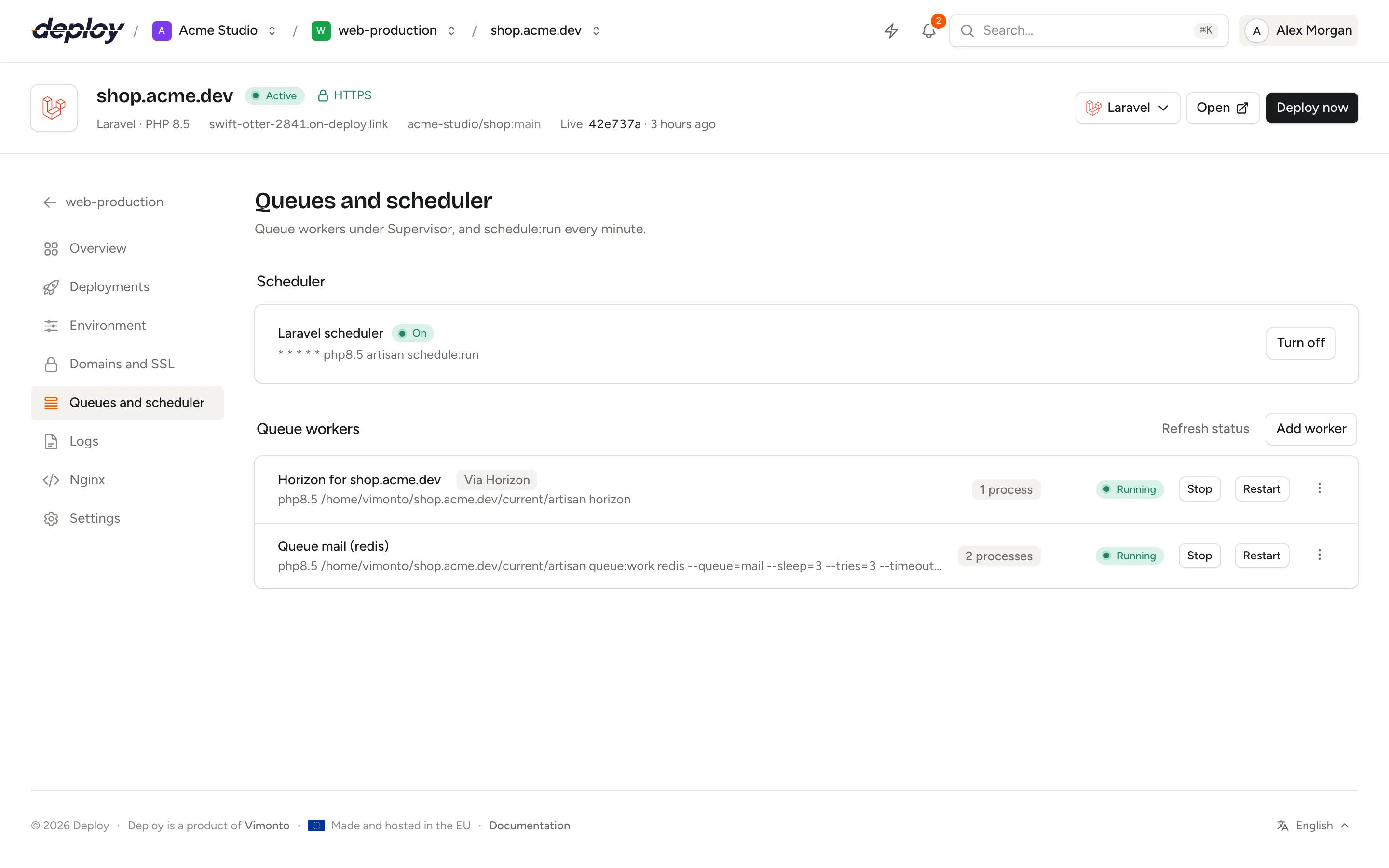
The page is shown for Laravel, Statamic, Next.js and Nuxt sites. For processes that do not belong to one site, use the server's processes and scheduler pages.
Turn on the Laravel scheduler
Laravel's scheduler runs the tasks you define in your app (routes/console.php or the console kernel). It needs one cron entry that runs every minute:
* * * * * php8.4 artisan schedule:run
Under Scheduler, click Turn on. Vimonto Deploy adds the cron entry for the site, running as the site's user in the live release. The status changes to On once it is in place. Click Turn off to remove it. Each run's output is kept in a log: open the server's scheduler page and click Log next to the job marked Via Scheduler.
The scheduler is also listed as Scheduler in the site features menu; both switch the same thing.
Add a queue worker
A queue worker runs php artisan queue:work and processes the jobs your app dispatches. To add one:
- Click Add worker.
- Fill in the settings below.
- Click Add.
| Setting | Default | What it does |
|---|---|---|
| Connection | redis (or database on a server without Redis) |
The queue connection from config/queue.php. |
| Queue | default |
The queues to work, separated by commas, in order of priority, such as high,default. |
| Processes | 1 | How many copies of the worker run side by side (up to 50). |
| Timeout (seconds) | 60 | How long one job may run before it is stopped (--timeout). |
| Tries | 3 | How often a failing job is attempted (--tries). |
| Sleep when empty (seconds) | 3 | How long to wait when the queue is empty (--sleep). |
| Restart after (seconds) | 3600 | The worker exits and is started fresh after this long (--max-time). |
| Memory (MB) | 256 | The worker restarts when it uses more memory (--memory). |
The worker runs as the site's user in the site's live release, with the site's PHP version:
php8.4 /home/vimonto/shop.example.com/current/artisan queue:work redis --queue=default --sleep=3 --tries=3 --timeout=60 --max-time=3600 --memory=256
For a monorepo, the worker runs in the site's root directory inside the release, for example /home/vimonto/shop.example.com/current/backend/artisan with a root directory of /backend. The same goes for the scheduler and the processes of site features such as Horizon.
When a worker is stopped, Supervisor gives a running job its timeout plus five seconds to finish before stopping it.
Workers restart after every deploy
When a deploy goes live, Vimonto Deploy runs php artisan queue:restart. Each worker finishes its current job and exits, and Supervisor starts it again on the new release. You do not need to add this to your deploy script.
See whether workers are running
Each worker shows its name, command, number of processes and the live state from Supervisor: Running, Starting, Stopping, Stopped or Failed. Click Refresh status to fetch the state again.
For each running worker you can:
- Restart it. After changing the
.env, the Restart the workers option when you save it restarts every worker of the site for you. - Stop it, and Start it again later. A stopped worker stays stopped until you start it or the server reboots.
- View log, which opens the server's processes page with the worker's output.
- Delete it. Its processes stop and are not started again.
Workers made by site features
Some site features run processes of their own, such as Horizon, Reverb, Pulse, Inertia SSR and Nightwatch. They appear in the list with a Via … badge, for example Via Horizon. You can see their state and restart them here, but you change or remove them only through the feature in the site header.
Run a Node.js app
For Next.js and Nuxt sites, the page is called Processes. Nginx forwards requests to the app on the site's port (shown on the site's overview and set under site settings as Your app's port), so your app must be running and listening on that port.
You don't have to set this up: when you create the site, Vimonto Deploy adds a process that starts your app with PORT set to the site's port. It runs in the site's live release (in the root directory of a monorepo) as the site's user.
| Framework | Process | Command, for port 3000 |
|---|---|---|
| Next.js | Next.js app | env PORT=3000 npm run start (with your package manager) |
| Nuxt | Nuxt app | env PORT=3000 node .output/server/index.mjs |
Until the first deploy there is no code to start, so the process shows Waiting and Starts with the first deploy. The first deploy puts it on the server and starts it; a process that failed to start is tried again on the next deploy. If you change the port under site settings, the process moves to the new port too.
Supervisor restarts the app if it crashes, and Vimonto Deploy restarts it after every deploy so it runs the new build.
To run something else as well, or to start your app your own way, click Add process, type the Command (it runs in the site's live release, in the root directory of a monorepo, as the site's user), set the number of Processes and click Add. If you replace the app's own process, delete it so two copies don't compete for the same port.
Frequently asked questions
Do I need Supervisor for Laravel queues?
Yes, a queue worker is a long-running process that must be restarted when it stops. Vimonto Deploy configures Supervisor for you; every worker you add is a Supervisor program on the server.
Should I use Horizon or queue workers?
Use Horizon if your app uses Redis queues and you want its dashboard, metrics and auto-balancing. Switch it on in the site features menu. Use plain queue workers for the database driver or when you do not need Horizon. Do not run both on the same queues.
Why is my scheduled task not running?
Check that the scheduler is On and that the task is defined in your app. Scheduled tasks run in the live release, so a site that has not been deployed yet runs nothing. Its Log on the server's scheduler page shows what schedule:run printed on its last runs.
Do workers keep the old PHP version when I switch?
Yes. Workers and the scheduler keep the PHP version they were created with. After changing the site's PHP version under site settings, add them again.