

A team is a group of members together with the servers they work on, for example one team per client or per project. Teams decide which servers a member sees; the member's role still decides what they may change.
By default every member sees every server. When you set a member's server access to Only their teams' servers, they see only the servers of the teams they belong to, with everything on them. Owners and administrators always see every server.
You manage teams under Settings → Teams.
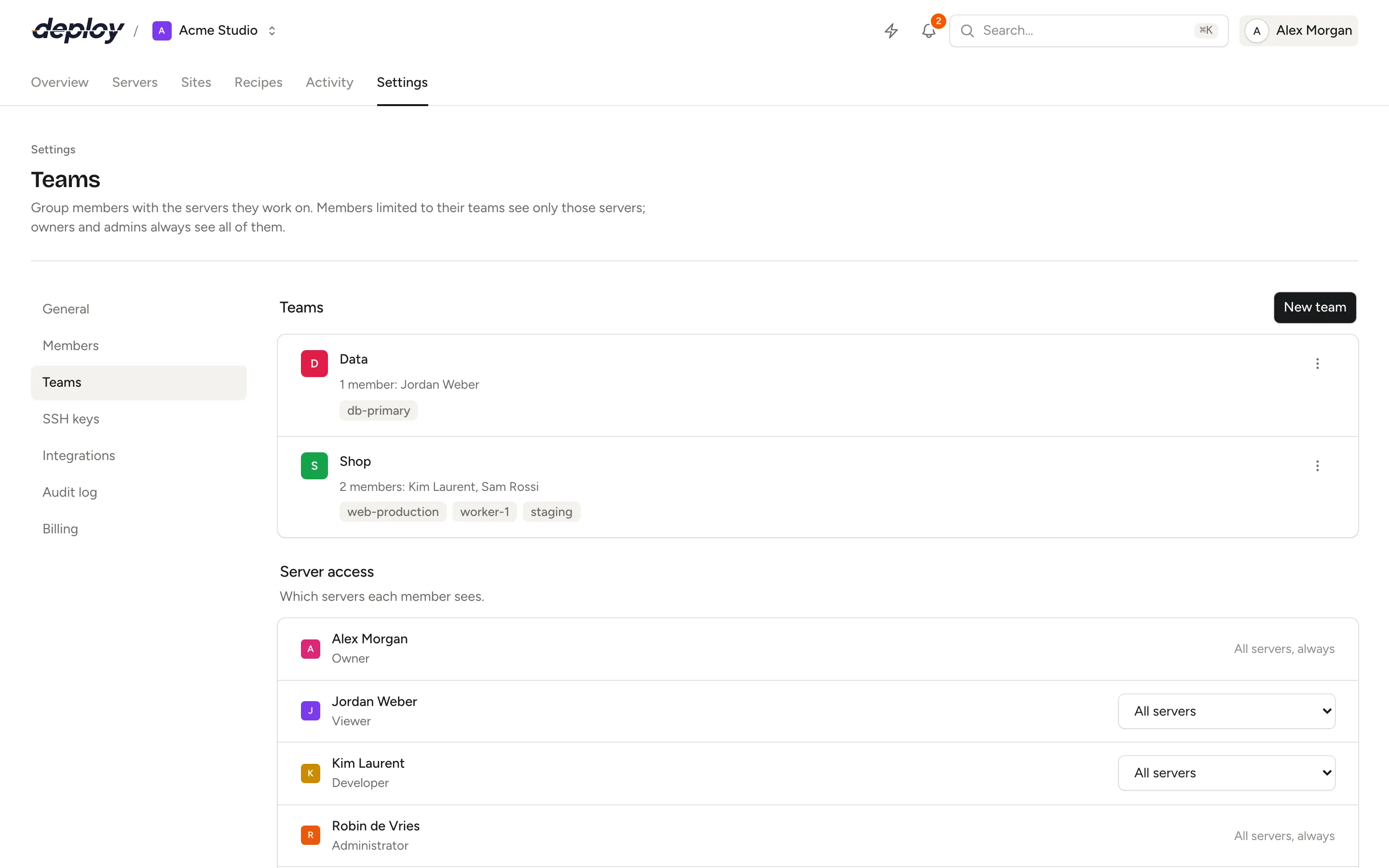
Create a team
- Open Settings → Teams.
- Click New team.
- Enter a Name, for example the name of a client or a project (at most 100 characters).
- Under Members, tick the members who belong to the team.
- Under Servers, tick the servers the team works on. The list only holds servers you can see yourself.
- Click Create team.
A member can be in several teams, and a server can belong to several teams. The list shows each team with its members and its servers.
Edit or delete a team
Open the menu next to a team and choose:
- Edit to change its name, members or servers, then click Save.
- Delete to remove the team. Members who are limited to their teams lose access to the servers this team gave them. The servers themselves stay.
If you are limited to your teams' servers yourself, the menu only appears next to teams whose servers you can all see. Otherwise you could add yourself to a team and get servers you aren't meant to see.
Limit a member to the servers of their teams
Under Server access you see every member and which servers they see:
- All servers: the member sees every server in the organization. This is the default.
- Only their teams' servers: the member sees only the servers of the teams they belong to.
Pick the option in the menu next to the member; the change takes effect immediately. Owners and administrators show All servers, always: their access can't be limited.
Nobody can widen their own access:
- You can't change your own server access. Ask an owner or administrator.
- Only members who see every server can change server access. A manager who is limited to their teams sees each member's access, but can't change it.
What does a limited member see?
A member who sees only their teams' servers gets the rest of the organization limited to those servers too:
- the Servers list, the server switcher and the overview show only their servers,
- the Sites list shows only the sites on their servers,
- Activity and the Audit log show only entries about their servers, plus entries that don't belong to a server, such as changes to members or teams,
- notifications only arrive for their servers,
- recipes can only be run on their servers, and Recent runs only shows runs on their servers,
- the Teams page only shows the names of their servers; a team without any server they can see shows No servers you can see,
- the API only returns their servers.
Any other server's pages return "not found" for them, as if it didn't exist.
When a limited member creates a server, the new server is added to their teams, so they don't lose sight of it.
Who can manage teams?
Every member can open the Teams page and see the teams. Creating, editing and deleting teams and changing a member's server access needs the owner, administrator or manager role. See members and roles.
A manager who is limited to their teams can still manage teams, within their own reach: they only add servers they can see, only edit or delete teams whose servers they can all see, and can't change anyone's server access.
When a member is removed from the organization or leaves it, they are taken out of all its teams as well.
Team changes are recorded in the audit log.
Frequently asked questions
Do teams change what a member may do?
No. Teams only decide which servers a member sees. What they may change on those servers still depends on their role: a viewer in a team still can't change anything.
What happens to a member's teams when they are removed?
They leave every team of the organization. If you invite them again later, they start without teams and see every server until you limit their access again.
Can I hide a server from an administrator?
No. Owners and administrators always see every server, whatever teams they are in.
Does a team cost extra?
No. The subscription is per organization, with unlimited teams. See billing.
What happens to a team when one of its servers is transferred?
The server leaves all its teams when it moves to another organization. See transfer a server.