

The Vimonto Deploy CLI is a small command-line tool called deploy. With it you deploy a site, follow its output and exit code, list your servers and sites, and run recipes and backups, from your own terminal or from a CI pipeline such as GitHub Actions or GitLab CI.
The CLI is a thin client of the Vimonto Deploy API: every command is one or more API requests, signed with a personal API token. It can do exactly what the token and your role in the organization allow, nothing more.
What do you need?
- PHP 8.2 or newer with the curl extension. The CLI is one PHP file without dependencies, so there is no Composer install. Check with
php -vandphp -m | grep curl. - An API token, made under Account settings → API tokens (see your account). The token is shown once, when you make it.
- macOS, Linux or WSL. The CLI also runs with
php deploy …on Windows, but hides the token while you type it only on macOS and Linux.
Install the CLI
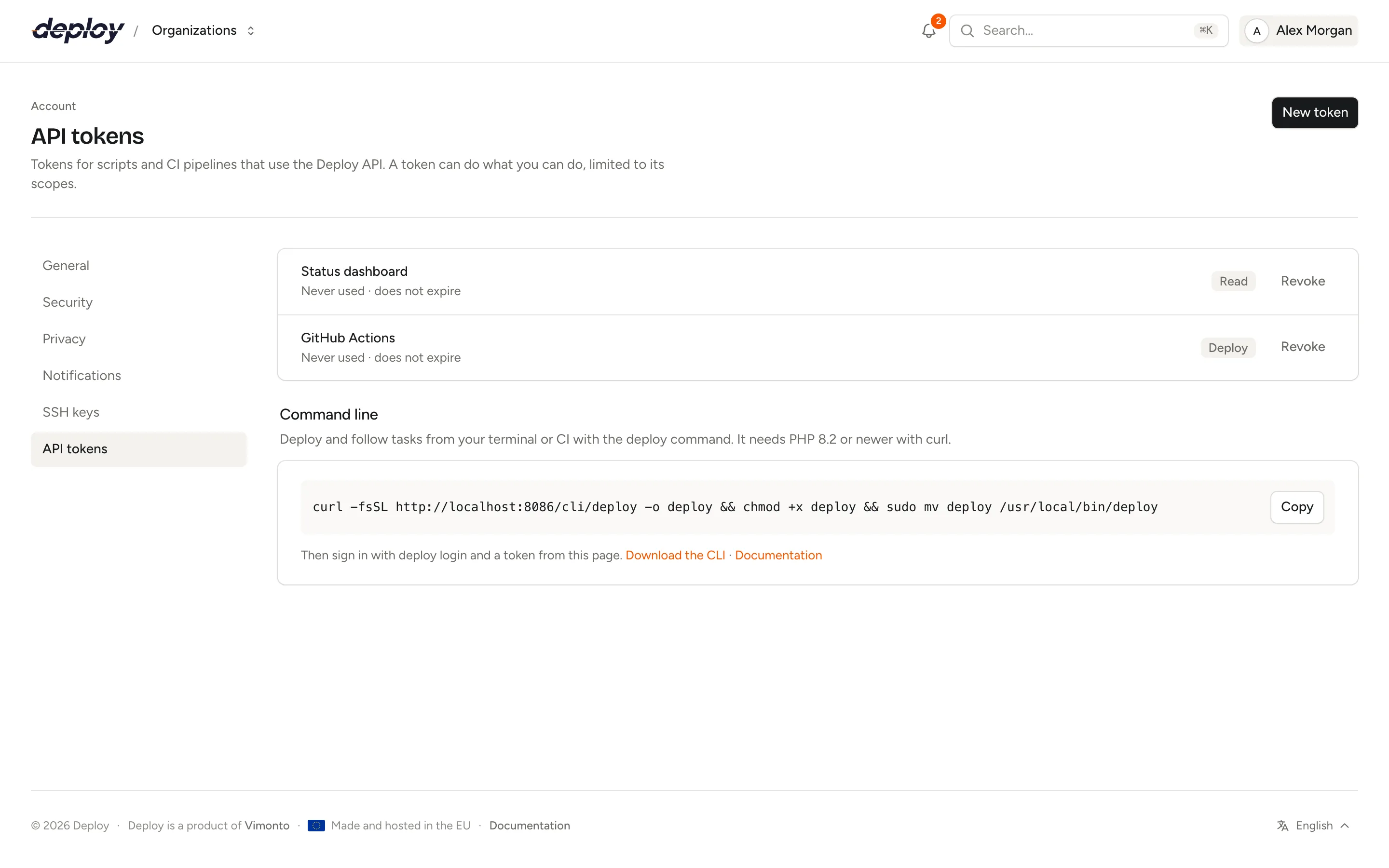
The CLI is the single file deploy. Download it from your Vimonto Deploy address at /cli/deploy (the link is also under Account settings → API tokens, with the command to copy), make it executable and put it in a directory on your PATH:
curl -fsSL https://deploy.example.com/cli/deploy -o deploy
chmod +x deploy
sudo mv deploy /usr/local/bin/deploy
deploy --version
deploy --version (or deploy version) prints the version, such as deploy 1.1.0. Without moving it, you can run the file directly as ./deploy or php deploy.
In a CI pipeline, commit the file to your repository (for example as bin/deploy), or download it in the job with the same curl command, and run it with php bin/deploy. The CLI has no other files and needs no installation. To update it, download it again.
Make an API token
- Open Account settings → API tokens and click New token.
- Give it a Name that says where it is used, such as
GitHub ActionsorMy laptop. - Choose the Scopes: Read, Deploy and/or Write (see the table below).
- Choose when it Expires: in 30, 90 or 365 days, or Never.
- Click Create token and copy the token from Your new token. It is shown only once; only its hash is stored.
Which scopes does a command need?
Listing needs Read (or Write). A token with only Deploy can still deploy a site and follow it: the CLI looks the site up by its domain or id, which that scope allows. Other work needs Write.
| Commands | Scopes the token needs |
|---|---|
login, orgs, use |
Any scope |
servers, sites, databases, recipes, backups |
Read or Write |
deployments, task |
Read, Deploy or Write |
deploy |
Deploy or Write |
database:create, recipe:run, backup:run |
Write |
On top of the scopes, your role in the organization applies: a token never does more than you can. A viewer cannot deploy, even with a Write token, and servers you have no access to are not listed. For a CI pipeline that only deploys, make a token with only Deploy.
Sign in with deploy login
Run deploy login and answer the two questions: the address of Vimonto Deploy (the URL you open in your browser) and the API token. The token is not shown while you type or paste it.
$ deploy login
URL of your Deploy app, such as https://deploy.example.com: https://deploy.example.com
API token (Account → API tokens):
✓ Logged in as Jane Doe (jane@example.com), scopes: read, deploy.
Organization: acme (change with "deploy use <org>")
You can also pass both at once: deploy login --url=https://deploy.example.com --token=…. Keep in mind that a token on the command line ends up in your shell history.
The CLI checks the token, then saves the URL, the token and the organization (the one you name with --org <slug>, else the one saved before, else your first; DEPLOY_ORG is never saved) in ~/.config/deploy/config.json (or $XDG_CONFIG_HOME/deploy/config.json when that variable is set). The directory is created with mode 0700 and the file with 0600, so only you can read it. To sign out, delete that file, and revoke the token under API tokens when you no longer need it.
Choose the organization
Most commands work in one organization. After deploy login that is the organization you used before, or else your first one. List yours with deploy orgs (the one in use has a *) and switch with deploy use:
$ deploy orgs
SLUG         NAME       ROLE
* acme       Acme       owner
  acme-labs  Acme Labs  developer

$ deploy use acme-labs
✓ Using acme-labs.
Add --org=<slug> to any command to use another organization for that one command.
Use the CLI in CI with environment variables
In a pipeline you do not run deploy login. Set these environment variables instead; they take precedence over the config file:
| Variable | Value |
|---|---|
DEPLOY_TOKEN |
The API token. Store it as a secret in your CI. |
DEPLOY_URL |
The address of Vimonto Deploy, such as https://deploy.example.com. |
DEPLOY_ORG |
The organization's slug, as in your URLs and in deploy orgs. |
Colours are left out when the output is not a terminal, and when NO_COLOR is set.
GitHub Actions
Add DEPLOY_TOKEN under Settings → Secrets and variables → Actions of your repository. This workflow deploys after the tests pass, and fails when the deploy fails:
# .github/workflows/deploy.yml
name: Deploy

on:
  push:
    branches: [main]

jobs:
  deploy:
    runs-on: ubuntu-latest
    # needs: tests   # run your test job first
    steps:
      - uses: actions/checkout@v4

      - name: Deploy shop.example.com
        run: php bin/deploy deploy shop.example.com --watch
        env:
          DEPLOY_TOKEN: ${{ secrets.DEPLOY_TOKEN }}
          DEPLOY_URL: https://deploy.example.com
          DEPLOY_ORG: acme
The GitHub-hosted Ubuntu runners come with PHP and the curl extension, so there is nothing to set up.
GitLab CI
Add DEPLOY_TOKEN as a masked variable under Settings → CI/CD → Variables of your project:
# .gitlab-ci.yml
deploy:
  stage: deploy
  image: php:8.3-cli
  rules:
    - if: $CI_COMMIT_BRANCH == "main"
  variables:
    DEPLOY_URL: https://deploy.example.com
    DEPLOY_ORG: acme
  script:
    - php bin/deploy deploy shop.example.com --watch
With --watch the job waits for the deploy and gets its result as the exit code, so a failed deploy turns the pipeline red. Without --watch the job ends as soon as the deploy has started.
Deploy a site
deploy deploy deploys the site's branch, the same as Deploy now in the app. Name the site by its domain or its id:
$ deploy deploy shop.example.com --watch
✓ Deploying shop.example.com (main) on web-1.
==> Fetch code
Cloning git@github.com:acme/shop.git (main)
HEAD is now at 3f9c2ab
==> Run deploy script
Installing dependencies from lock file
   INFO  Running migrations.
==> Go live
Linked current → releases/20261007101500
==> Clean up old releases
Kept the last 5 releases.
✓ Deploying to shop.example.com succeeded.
The CLI finds the site by its domain or id with a single request. When two servers have a site with the same domain, add --server <name> to look on one server only. A deploy started from the CLI shows up in the site's deploy list like any other; how deploys work is explained in deployments.
Without --watch, the command starts the deploy and prints the command to follow it:
$ deploy deploy shop.example.com
✓ Deploying shop.example.com (main) on web-1.
Follow it with: deploy task 4821 --watch
If a deploy of the site is already running, the CLI says so and gives that task's id, so you can follow it instead.
Follow a task with --watch
Deploys, new databases, recipes and backups run as tasks in the background. deploy task <id> shows a task's status and its output so far; with --watch it checks the task every two seconds, prints new output as it arrives and ends with the result:
$ deploy task 4821 --watch
--watch works on deploy, task, database:create, recipe:run and backup:run.
All commands
Run deploy help for the short version.
| Command | What it does |
|---|---|
deploy login [--url=… --token=…] |
Check a token and save it with the URL. |
deploy orgs |
List your organizations; * marks the one in use. |
deploy use <org> |
Work in another organization from now on. |
deploy servers |
List servers: id, name, type, status, IP address and PHP version. |
deploy sites [server] |
List the sites of one server, or of all servers: id, domain, server, framework, status, branch and last deploy. |
deploy deploy <site> [--watch] |
Deploy a site (domain or id). |
deploy deployments <site> |
The 25 most recent deploys: status, how it was started, commit and when. |
deploy task <id> [--watch] |
A task's status and output. |
deploy databases <server> |
List a server's databases. |
deploy database:create <server> <name> [--watch] |
Create a database on a server. |
deploy recipes |
List the organization's recipes. |
deploy recipe:run <recipe> <server>… [--watch] [--notify] |
Run a recipe on one or more servers. |
deploy backups <server> |
List a server's backups with their schedule and last run. |
deploy backup:run <server> <backup> [--watch] |
Run a backup now. |
deploy version |
Print the CLI's version; deploy --version does the same. |
deploy help |
Print the list of commands. |
Servers are named by their name or id, sites by their domain or id, recipes and backups by their name or id. Names are not case-sensitive. Put a name with spaces in quotes.
Options
| Option | Meaning |
|---|---|
--watch |
Wait for the task and exit with its result. |
--org=<slug> |
Use this organization for this command only. |
--server=<name> |
Look for the site on this server only (deploy, deployments). |
--url=<url> |
Use this Vimonto Deploy address for this command only. |
--notify |
recipe:run: email you a report when every server is done. |
--version |
Print the CLI's version, whatever the command. |
--help, -h |
Print the list of commands. |
Options take their value after a space or an =: --org acme and --org=acme are the same.
List servers and sites
$ deploy servers
ID  NAME   TYPE      STATUS  IP            PHP
12  web-1  app       active  203.0.113.10  8.4
14  db-1   database  active  203.0.113.11

$ deploy sites web-1
ID  DOMAIN            SERVER  FRAMEWORK  STATUS     BRANCH  DEPLOYED
31  shop.example.com  web-1   laravel    installed  main    2 h ago
Databases, recipes and backups
deploy databases web-1
deploy database:create web-1 shop_reports --watch

deploy recipes
deploy recipe:run "Clear caches" web-1 web-2 --watch --notify

deploy backups db-1
deploy backup:run db-1 "Nightly" --watch
A database name may contain letters, digits and underscores, up to 63 characters, and the server must be ready and have a database installed. recipe:run starts one task per server; with --watch it follows them one after another and fails if any of them failed. More about recipes in recipes.
Exit codes and errors
| Exit code | When |
|---|---|
0 |
The command worked. With --watch: the task succeeded. |
1 |
Any error, or with --watch a task that failed or was cancelled. |
deploy task <id> without --watch also exits with 1 when the task failed or was cancelled, and with 0 while it is still queued or running.
Errors are printed to standard error, after a ✗:
| Message | What to do |
|---|---|
Not logged in. Run "deploy login", or set DEPLOY_TOKEN. |
Sign in, or set DEPLOY_TOKEN and DEPLOY_URL in CI. |
No organization chosen. Run "deploy use <org>". |
Choose one with deploy use, --org= or DEPLOY_ORG. |
The token was not accepted. It may be revoked or expired: run "deploy login" again. |
Make a new token and sign in again. |
This token or your role does not allow that. |
The token lacks a scope (see the table above), or your role does not allow the action. |
Not found. Check the name, and that you have access to it. |
The organization, server or site does not exist, or you have no access to it. |
No site "…". / No server "…". |
Check the domain or name, or that you use the right organization. |
Too many requests. Wait a minute and try again. |
A token may make 120 requests a minute. |
Messages from Vimonto Deploy itself, such as a site that has no repository yet or a deploy that is already running, are printed as they are.
Frequently asked questions
Does the CLI need SSH access to my servers?
No. The CLI only talks to the Vimonto Deploy API over HTTPS. Vimonto Deploy then does the work on the server, as it does when you click a button in the app.
Where is my token stored?
On your own machine, in ~/.config/deploy/config.json with permissions 0600. In CI, the token comes from the DEPLOY_TOKEN variable and nothing is written to disk.
Why does my CI token get "This token or your role does not allow that"?
deploy, deployments and task work with a token with only Deploy. Other commands, such as servers or sites, need Read or Write (see the table above). Also check that your role in the organization may deploy, and that you use version 1.1.0 or newer of the CLI (deploy --version): older versions looked the site up through the server list, which needs Read.
Can I use the CLI for more than one Vimonto Deploy organization?
Yes. One token works in every organization you are a member of. Switch with deploy use <org>, or add --org=<slug> to one command.
Is there an API for things the CLI cannot do?
The CLI covers the most common tasks. The API has the same endpoints the CLI uses, so you can also call it directly from your own scripts.