

The PHP page of a server lists the PHP versions installed on it. Vimonto Deploy installs PHP from the ondrej/php repository, so several versions can run side by side: each version has its own PHP-FPM service and its own settings, and every site picks the version it runs on. From this page you install and remove versions, choose which version is the default, change the most common PHP settings and install patch releases.
The page is available on app servers, web servers and worker servers, the server types that run PHP.
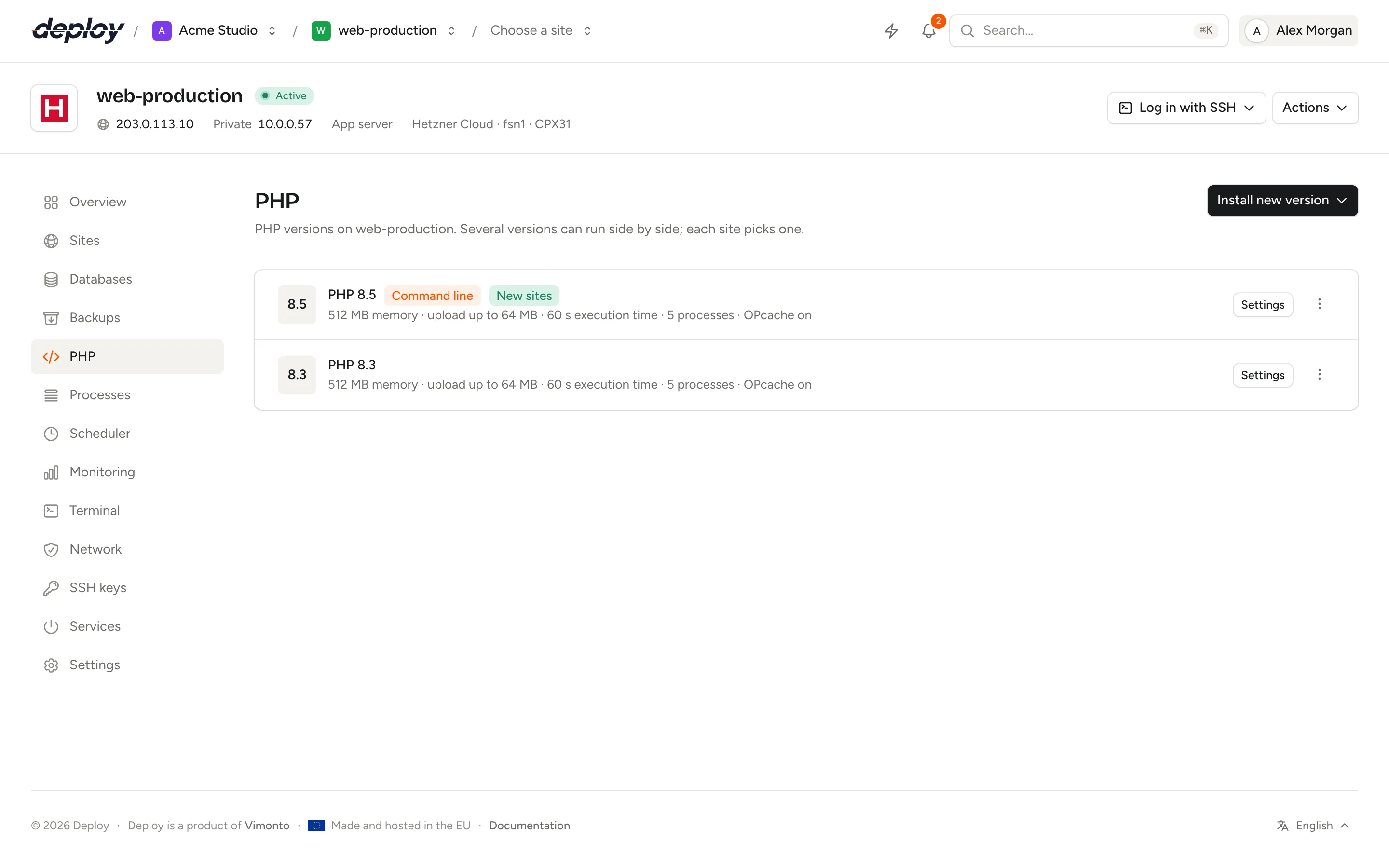
Which PHP versions can you install?
Vimonto Deploy offers PHP 8.5, 8.4, 8.3, 8.2 and 8.1. A new server gets the version you chose when you created it, and that version starts as the default for both the command line and new sites.
Every version is installed with the same set of extensions:
| Extensions |
|---|
| bcmath, cli, curl, fpm, gd, igbinary, imagick, intl, mbstring, memcached, msgpack, mysql, pgsql, readline, redis, soap, sqlite3, xml, zip |
The first install also puts Composer on the server, after checking the installer against its published signature.
Install a new PHP version
- Open the server and choose PHP in the sidebar.
- Click Install new version and pick a version from the menu. The menu only lists versions that are not on the server yet.
- Confirm with Install.
Installing takes a few minutes. The version shows as Adding while the task runs and you can follow it on the activity page. Existing sites keep using their own version: installing a new one changes nothing for them.
If the installation fails, the row shows Failed and a Retry button. Every step is safe to run again.
What are the command line default and the new-site default?
Each server has two defaults, shown as badges next to the version:
- Command line: the version that runs when you or a script type
phpon the server, for example in the terminal, in scheduled jobs and in processes that callphp. Vimonto Deploy sets it withupdate-alternatives. - New sites: the version preselected when you create a site on this server. It does not change sites that already exist.
To change a default, open the actions menu (⋯) of a version and choose Default on the command line or Default for new sites. The command line default runs a short task on the server; the new-site default is saved straight away.
To move an existing site to another version, change its PHP version in the site settings.
Change PHP settings
Click Settings next to a version to change its most common settings. Each version has its own values, and Apply writes them to the server and reloads PHP-FPM.
| Setting | Default | Range | What it does |
|---|---|---|---|
| Memory limit (MB) | 512 | 64 to 16384 | The most memory one request may use (memory_limit). |
| Maximum upload (MB) | 64 | 1 to 4096 | The largest upload and request body (upload_max_filesize and post_max_size). Applies to Nginx too. |
| Maximum execution time (seconds) | 60 | 5 to 3600 | How long one request may run (max_execution_time). After that PHP-FPM stops the request. |
| Max. input variables | 1000 | 1000 to 100000 | How many form fields a request may have (max_input_vars). Large forms, such as in WordPress or Magento, need more. |
| PHP-FPM processes | 5 | 2 to 500 | How many requests PHP handles at once (pm.max_children). |
| OPcache | On | On or off | Caches compiled PHP code. Faster, and almost always wanted in production. |
These settings apply to PHP-FPM, which serves your web requests. The command line uses its own configuration with a memory limit of 1 GB, so long Artisan commands and Composer installs are not limited by the web value.
How many PHP-FPM processes do you need?
Each PHP-FPM process handles one request at a time and can use up to the memory limit. A simple rule: the number of processes times the typical memory per request must fit in the server's free memory, next to the database and other services. If requests queue up while the server still has memory and CPU to spare, raise the number; if the server runs out of memory, lower it or lower the memory limit. The monitoring page shows memory and load over time.
The pool's spare-process settings follow the number you choose, so you only set the maximum.
Do the settings apply to isolated sites?
Partly. An isolated site has its own PHP-FPM pool, running as its own Linux user. The memory limit, upload size, execution time, input variables and OPcache apply to it as well, because they are PHP settings of the version. The PHP-FPM processes number applies only to the shared pool; an isolated site's pool starts processes on demand, up to 10.
Update to the latest patch release
Open the actions menu (⋯) of a version and choose Update to the latest patch. Vimonto Deploy updates the packages of that version only (for example from 8.4.11 to 8.4.12), then restarts its PHP-FPM service. Patch releases contain security and bug fixes, not new language features.
Servers also install security updates automatically, so this action is mainly useful when you need a fix right away.
Remove a PHP version
Open the actions menu (⋯) and choose Remove, then confirm. Vimonto Deploy stops the version's PHP-FPM service, removes its packages and deletes its configuration.
You cannot remove a version that is the command line default or the default for new sites: make another version the default first.
Frequently asked questions
How do I increase the PHP upload limit?
Open PHP, click Settings next to the version your site uses, raise Maximum upload (MB) and click Apply. Vimonto Deploy changes both PHP's upload and post limits and Nginx's request body limit.
Can different sites on one server use different PHP versions?
Yes. Install every version you need on the PHP page, then choose the version per site when you create it or later in its settings.
Why does php -v on the server show another version than my site?
The command line uses the Command line default, while each site uses its own version through PHP-FPM. Make the site's version the command line default, or call the version directly, for example php8.4 artisan migrate.
Can I edit php.ini by hand?
Vimonto Deploy writes its settings to /etc/php/{version}/fpm/conf.d/99-vimonto.ini and overwrites that file when you click Apply. Changes in other files under /etc/php are left alone, but settings in 99-vimonto.ini take precedence over most of them.